SQL inspections shows a lot of false-positive errors in PHPStorm 6

The latest version of PHPStorm allows me to activate SQL Inspections.
The problem is that a lot of SQL strings are dynamically created with PHP variables or by concatenate different SQL lines (see attached picture).
In consequence, a lot of files are underlined in red even if they don't contain any error at all.
I can disable SQL inspections by setting SQL dialect to "keywords only" but then I will also lose autocomplete and other useful stuff.
Is there a way to turn SQL errors into simple warnings?
Thanks,
Fabio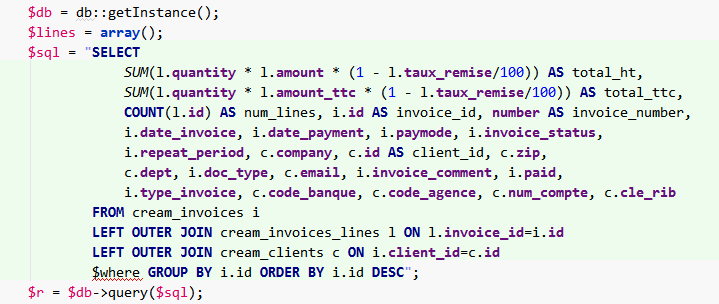
Please sign in to leave a comment.
Hi Fabio,
Try Alt+Enter on error, see which inspection is that, right arrow (to see submenu for that menu entry) and choose "Edit inspection..." -- you should be able to either disable that inspection .. or lower it's priority.
I'm not 100% sure, but I think that inspection will be "Settings | Inspections | SQL | Unresolved reference".
On related note: http://youtrack.jetbrains.com/issue/WI-2450
Thanks for your answer.
Apparently, there is no specifi inspection for those errors. So it seems impossible to disable them.
Similar call for help in PyCharm at https://intellij-support.jetbrains.com/hc/en-us/requests/622423
Some of the exotic, barely-googlable error messages I've seen with this problem:
<comma join expression> expected, unexpected end of file
'(', <reference>, GROUP, HAVING, UNION, WHERE or '{' expected, got '{'
'(', <reference>, or '{' expected, got '}'
I am pre-formating my SQL queries too and am constantly getting errors like "expression expected, got %s" instead. No way to turn it off via alt-enter or inspections.
Nicolaibiker, by default, %s should be considered a user parameter and should not be highlighted. Please check: https://youtrack.jetbrains.com/issue/WI-35847
Could you please share a code sample?
I managed to turn off the language injection to avoid this issue, but when it's turned on, it looks like this:
PhpStorm 2018.1.6
Build #PS-181.5281.35, built on June 14, 2018
JRE: 1.8.0_152-release-1136-b39 amd64
JVM: OpenJDK 64-Bit Server VM by JetBrains s.r.o
Windows 10 10.0
It seems that in the latest version it works fine :) Thanks.
PhpStorm 2018.3.3
Build #PS-183.5153.36, built on January 9, 2019
JRE: 1.8.0_152-release-1343-b26 amd64
JVM: OpenJDK 64-Bit Server VM by JetBrains s.r.o
Windows 10 10.0
Yeah, there was a number of improvements in this in latest updates.
I cannot find any solution how to turn this checking it off. All SQL Inspections are already turned off. Lnguage Injections turned off.
Error shown:
':=', '=' or '[' expected, got ','
PHP-Source:
$this->DB->query[__METHOD__]['sql'] =
sprintf("update DP set %s, %s where DP_ID=%d"
, implode(",", $fieldsDP)
, $this->RLG->getLCB(__METHOD__)
, $DP_ID);
JetBrains Client 2023.2.3
Build #JBC-232.10072.32, built on October 13, 2023
Runtime version: 17.0.8.1+7-b1000.32 aarch64
VM: OpenJDK 64-Bit Server VM by JetBrains s.r.o.
macOS 14.1
Controller in Remote Development (PS), direct control type: Lux
GC: G1 Young Generation, G1 Old Generation
Memory: 2048M
Cores: 8
Metal Rendering is ON
Registry:
editor.input.method.inlay=true
rdclient.backend.actionHandlers=false
Non-Bundled Plugins:
com.intellij.plugins.vibrantink.colorscheme (232.8660.142)
com.intellij.plugins.all_hallows_eve.colorscheme (232.8660.88)
com.intellij.plugins.warmneon.colorscheme (232.8660.142)
com.intellij.plugins.rails_casts.colorscheme (232.8660.88)
com.intellij.plugins.visualstudiokeymap (232.8660.88)
com.intellij.plugins.netbeanskeymap (232.8660.88)
com.intellij.plugins.monokai.colorscheme (232.8660.88)
com.intellij.plugins.eclipsekeymap (232.8660.88)
com.intellij.plugins.blackboard.colorscheme (232.8660.88)
com.intellij.plugins.twilight.colorscheme (232.8660.88)
com.intellij.plugins.cobalt.colorscheme (232.8660.88)
com.intellij.plugins.vscodekeymap (232.8660.88)
found a workaround, so the “update statement” is not recognized as such any more :
sprintf("update "." DP set" …);
@Alex
This is very broad from SQL point of view (because
%s, %sdoes not make much sense there, unless of course you are making SQL statement on the fly from parts).From SQL side of things having it as
update DP set %s=%s, %s=%s where DP_ID=%dhas more sense (because overall it matches the expected structure/syntax for the UPDATE statement).Other things you can potentially do (depends on your needs and what you can do with the code etc.):
/** @lang GenericSQL */just before the string start./** @lang Text */instead. That's in case you do not want any colors there at all or it still does not work good enough.This worked for me thanks!