How configuration local external server

How to use local server Apache, when I point debug address bar of the chrome when there is (
file:///D:/APMServ5.2.6/APMServ5.2.6/APMServ5.2.6/www/htdocs/javascript/js/%E8%B7%9F%E9%9A%8F%E9%BC%A0%E6%A0%87%E6%95%88%E6%9E%9C.html), and I want to let the address bar appears is (127.0.0.1 / index)
How to configure the local external server rather than webstrom own server
Please sign in to leave a comment.
Hi there,
Settings | Deployment:
This is where the URL will be taken from when using "View | Open in browser" or similar commands.
P.S.
When creating Run/Debug configuration (Run | Edit Configurations...) you most likely will need to enter full URL anyway.
If create local server on this picture how to fill in
Most likely you have choosen the Run configuration of wrong type -- I have no idea what type it is (it looks like JavaScript Unit tests or something -- at very least I have no such layout on my setup).
You need to be more specific, show more details.
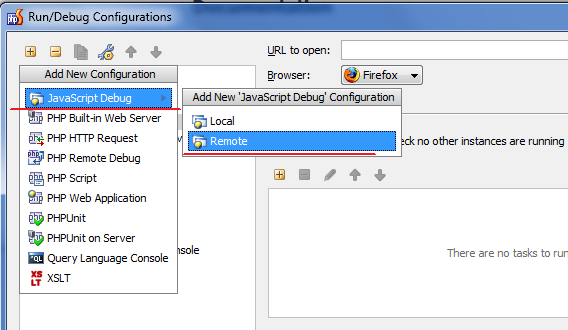
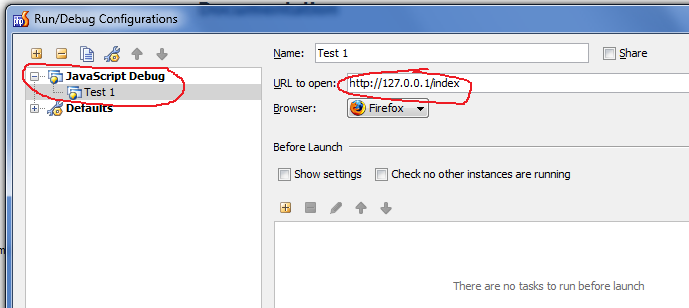
As I understand you want to open JavaScript file in browser. If so -- then you need create Run/Debug configuration of "JavaScript Debug / Remote", where you can enter actual URL.
I told according to your tips, I set the but have this problem
Hi there,
You still doing somethig wrong (something is missing or misconfigured). Please tell exactly what you have done/what you are doing (how and what you have configured; what commands you executing etc) and provide screenshots if possible (would really help here - small screencast would be even better).
What is your MSN or QQ? I am Chinese, so don't conference exchanges with you in English
Don't know I loacl set right trouble see
1) Well, I do not speak Chinese.
2) I'm confused on what you are doing here:
If you do that, then file D:\AMPServ5.2.6\AMPServ5.2.6\www\htdocs\javascript\js\hello.js should be opened as http://127.0.0.1/hello.js (that's considering that your Apache is configured properly).
I set the Local / Mounted folder
How do local mapping
I'm getting more and more confused.
I host a local Apache server I opened locally should be 127.0.0.1/index.html
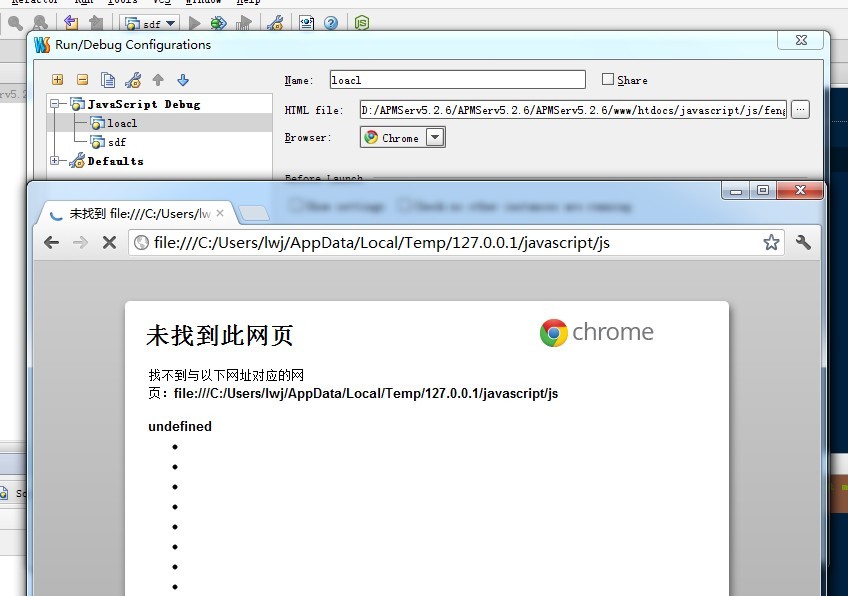
I opened the file :/ / / C :/ Users/lwj/AppData/Local/Temp/127.0.0.1/javascript/js (The Road King is the disk path to)
I configuration when
Project root 'D: \ APMServ5.2.6 \ APMServ5.2.6 \ APMServ5.2.6 \ www \ htdocs \ javascript \ js' is not mapped.
Please review your deployment settings.
I'll give it one more attempt before I give up -- I'm totally confused here (possibly the language barier plays a big role here).
Can you please answer these questions specifically:
For example:
For such configuration I create "In place" deployment entry (Settings | Deployment) with these paths:
Then I create this Run/Debug Configuration (Run | Edit Configuration)
My project is located at D: \ APMServ5.2.6 \ APMServ5.2.6 \ APMServ5.2.6 \ www \ htdocs \ javascript \ js
I'm trying to open: \ APMServ5.2.6 \ APMServ5.2.6 \ APMServ5.2.6 \ www \ htdocs \ javascript \ js \ index.html
Website Root is D: \ APMServ5.2.6 \ APMServ5.2.6 \ APMServ5.2.6 \ www \ htdocs
How do I create it? Give me a illustration
I have created can be used not
Good, now we have some real details to work with.
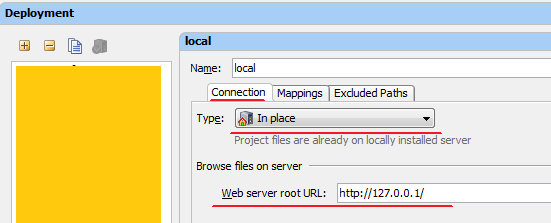
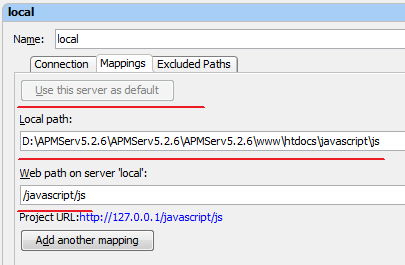
Website Root D:\APMServ5.2.6\APMServ5.2.6\APMServ5.2.6\www\htdocs
Project Root: D:\APMServ5.2.6\APMServ5.2.6\APMServ5.2.6\www\htdocs\javascript\js
For such setup you need to create Deployment entry of "In Place" type:
Do not forget to mark it as Default for this project.
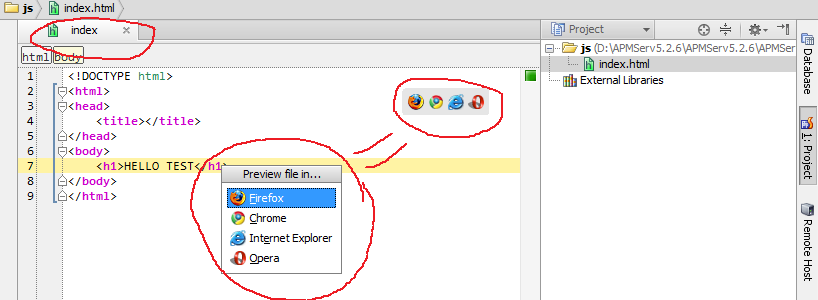
Now -- make sure that you have setup your available browsers in IDE: Settings | Browsers (you may need to restart your WebStorm if you have just configured them -- sometimes it seems to be slow reacting to the changes). For example: I have Firefox, Internet Explorer, Opera and Chrome configured; Default browser in system is Firefox.
When done, you can use "View | Open in Browser" (will open in default browser) or "View | Web Preview..." (you can choose the browser). The last command available via that menu or via automatically appearing semi-transparent popup with browser icons.
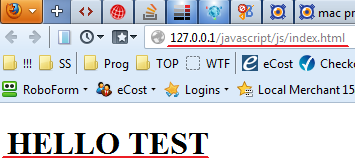
The result of any of those commands 9if I choose firefox) will be:
As you can see it works perfectly for me.
Thank you for your patience as I answer