Modified lines bar

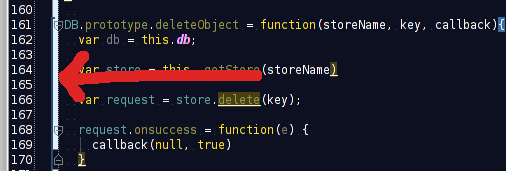
I've spent the last hour trying to figure out how to get rid of/change color of this bar. I just can't seem to find it.. help?
edit:it's related to git. it's the on every line that has been modified since last commit...
Attachment(s):
Screenshot at 2012-03-13 15:32:43.png
Please sign in to leave a comment.
Hi linus,
Try Settings | Editor | Colors & Fonts | General:
I've set both of them to dark colors without any success.
I also tried to uncheck the boxes, but the bar is still there
The bar will be there in any case -- AFAIK you cannot remove it.
In this case Settings | Editor | Colors & Fonts | Diff
Thanks.
Looks like it's broken for dark themes..
I "solved" it by disabling git
You can't