Debug connection with Xdebug was not established

Hi guys!
Firstly i'd like to thank you for PHPStorm it is really awesome!
I'm trying to use Xdebug by debugging PHPUnit test case and the subject error is always displays.
I did all advices from this comment:
http://blogs.jetbrains.com/webide/2011/02/zero-configuration-debugging-with-xdebug-and-phpstorm-2-0/#comment-10024
but it not helped
Btw debugging using bookmarklets not works for me too (
I'm using PHPStorm 2.1 with Ubuntu 10.04
Please sign in to leave a comment.
Dima,
Do you use firewall or something that can prevent connections to PhpStorm?
Also please leave your xdebug settings here.
Thank you for feedback!
Hello !
I work with xdebug and xampp 1.7.4 on a windows 7, 64 bit pc.
The debugging works fine.
Which xdebug - roles are in the php.ini.
Greetings Stephan
Hello Nikolay
I dont use firewall
Here is xdebug settings:
Dima,
Your xdebug settings looks OK.
Please attach screenshot of your debug settings(Project Settings -> PHP -> Debug) and describe used run configurations.
Thank you for feedback!
Nicolay,
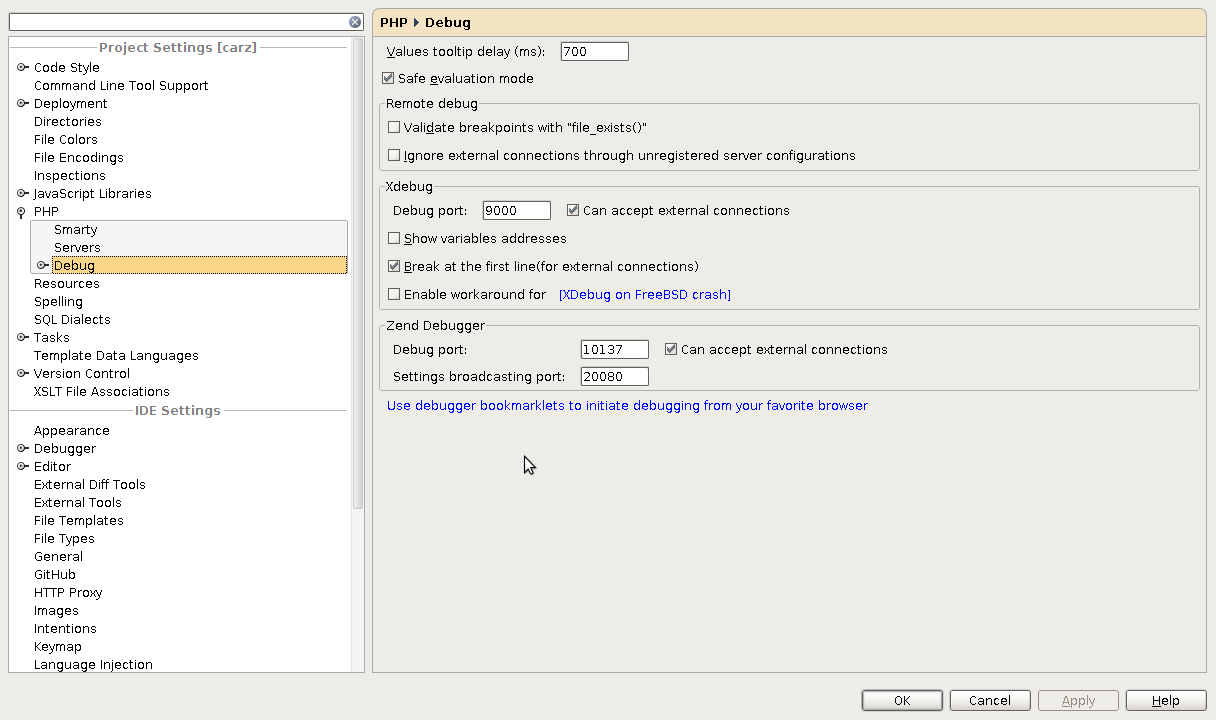
Here is my debug settings:
And i'm not sure what you mean about run configuration
I just found the problem. The solution is a first jrebelo comment here: http://ubuntuforums.org/showthread.php?t=525257
It was because I used php.ini to enbale xdebug. Thats why it is not worked for PHP CLI . So i created /etc/php5/conf.d/xdebug.ini with:
zend_extension="/usr/lib/php5/20090626+lfs/xdebug.so"
xdebug.remote_enable = 1
The problem solved. Thank you
Hello, Dima We should provide proper validation for such cases. Please vote - http://youtrack.jetbrains.net/issue/WI-4610 Thank you for feedback!
I got this issue too, and the problem was with Windows Firewall.
Same problem with the default php version installed in MacOs, adding the `xdebug.remote_enable = 1` solved it.
Another fix for this:
PHP-FPM explicitly uses port 9000. Changing the xdebug config to use port 9001 should fix this problem.
Remember to update the IntelliJ/PHPStorm config, too.
Thanks Matt, it worked for me.