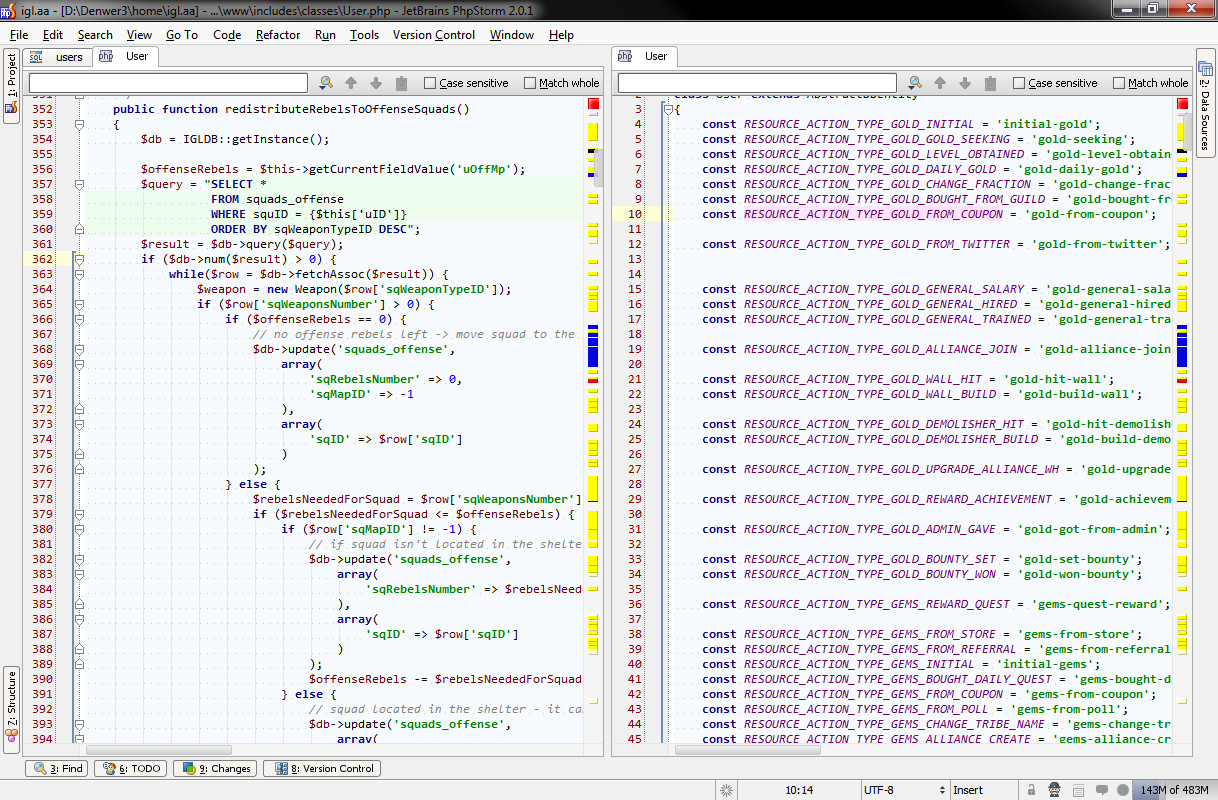
Inconvenient close button position in the Search bar (Ctrl+F)

Maybe I'm just being nitpicky, but does anyone else find it inconvenient that the close button for this toolbar is on the far right?
- I don't use the search bar enough to remember instantly that it's way over there. It usually takes me a couple seconds just to find it because its not close to the other elements on the bar.
- Running 1920x1200 resolution --- I spend on average 2 seconds moving my cursor way over to the right-edge of the screen to close the bar.
So adding that up, for me it takes average 3-4 seconds to close the search bar after I'm done with it.
I like how Firefox positions the X for their search bar on the far left. If it were done that way in the IDE:
- The button is grouped with the other elements on the search bar, making it far more noticeable.
- It's closer to the primary elements of the IDE (Project & Tabs), which is where my cursor usually hovers around.
Please sign in to leave a comment.
Hi Shaun,
Just press Esc to close Search Bar (works even when you are in editor area)
Cool, but what do you think of moving the close button for people who are/were unaware of that?
And on my 1280 wide monitor in "split horizontaly" mode (2 tabs) close button isn't visible, but nobody cares...