DB Navigator connection

Hello,
i tried to configure a mysql connection via DB Navigator, but it doesn´t work. At the online help is only a screen from settings with ORA DB. Is there any documentation for a mysql connection setting?
best regards
Sascha
Please sign in to leave a comment.
DB Navigator is a 2rd party plugin and we can't provide any support or information on it.
Anyway, may be you just want to use built-in database support?.. Its proven to work great with all supported databases (incluging mysql).
Go to Tools|Data Sources to add a connection. Also, visit Settings|SQL dialects and set project dialect accordingly, to enable completion and proper SQL systax checking.
Hi Sascha,
Have a look at the actual DB Navigator plugin page: http://plugins.jetbrains.com/plugin/?webide&id=1800, especially at comment dated 2011-02-04 -- this may be what you need (copied here for convenience):
In any case -- I think the setup (parameters) should be similar to PhpStorm's built-it functionality -- see the image attached to this post.
Hello Andriy,
thx alot for this information. Now it works fine:)
regards
Sascha
Hello,
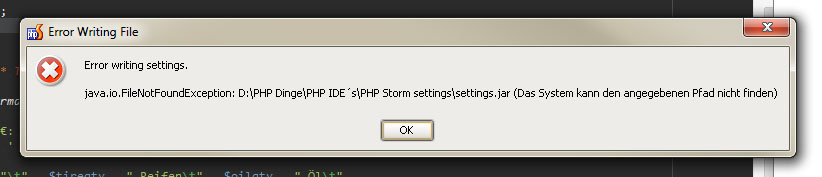
now i have another problem. After installing the driver libary, i became a error message when i will save my settings.
Have a look here:
best regards
Sascha
No idea, but if it caused by DB Navigator plugin then you should be contacting its' author.
P.S.
Maybe, just maybe, it is caused by some symbols (apostrophe) in the file path ?
Hello,
ok i need more coffee this morning. I have manually changed a path and forget it.
Sorry for that.
Another once, thx
best wishes
Sascha