Changing indentation in project view

Hi!
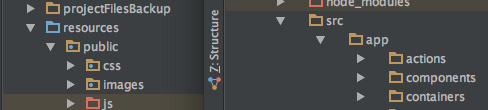
My issue is a fairly nit-picky one, but there should be a simple answer! In IDEA Community edition, my project view has a very small indentation when drilling down through project folders. In Webstorm 11, it is much larger and frankly kind of obnoxious. Is there an easy way to change this?
The attached picture shows what I want on the left (from IDEA), and what I have on the right (from Webstorm). Please tell me there's a simple setting! Thanks in advance.
Please sign in to leave a comment.
Please try restarting WebStorm - does it help? Looks similar to https://youtrack.jetbrains.com/issue/IDEA-146089, the problem usually occurs are exiting Presentation mode
Ha! I can't believe I didn't try that. Works like a champ. thanks so much!