Python Interpreter Paths ignored?

I have a module library (mixture of compiled Python/C) that exists within my Project structure in PyCharm but not contained in the Lib/site-packages folder in Python26. This module is in the PYTHONPATH in the windows environment variables.
PYTHONPATH = D:\SVN\QSTrunk\faker;
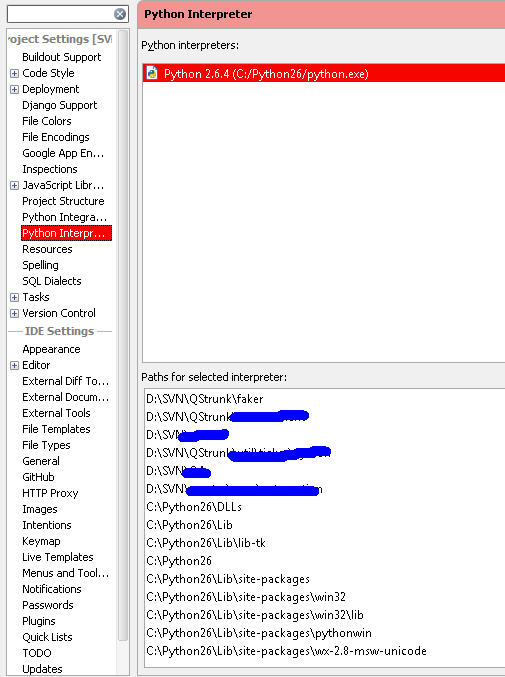
PyCharm sees the environmental variable because the path appears in the Python Interpreter menu. I do not have the module folder path listed as a source in the Project Structure menu.
While using the IDE, the code inspection (introspection?), autocomplete, and source linking appears to work as expected for functions within the module. It picks up the _faker.pyd functions found within the PythonPath folder. However, when I try to debug a script that contains something like import faker.core as fk, the debugger cannot find the module.
ImportError: No module named faker.core
I ran the following just prior to the 'import faker' statement to see what was going on.
for x in sys.path:print x
Connected to pydev debugger (build 107.268)
D:/SVN/QAsandbox/cases
C:\Program Files (x86)\JetBrains\PyCharm 1.5.2\helpers\pydev
C:\Program Files (x86)\JetBrains\PyCharm 1.5.2\helpers
D:\SVN
C:\Windows\system32\python26.zip
C:\Python26\DLLs
C:\Python26\lib
C:\Python26\lib\plat-win
C:\Python26\lib\lib-tk
C:\Python26
C:\Python26\lib\site-packages
C:\Python26\lib\site-packages\win32
C:\Python26\lib\site-packages\win32\lib
C:\Python26\lib\site-packages\Pythonwin
C:\Python26\lib\site-packages\wx-2.8-msw-unicode
Traceback (most recent call last):
File "C:\Program Files (x86)\JetBrains\PyCharm 1.5.2\helpers\pydev\pydevd.py", line 1198, in <module>
debugger.run(setup['file'], None, None)
File "C:\Program Files (x86)\JetBrains\PyCharm 1.5.2\helpers\pydev\pydevd.py", line 954, in run
execfile(file, globals, locals) #execute the script
File "D:/SVN/QAsandbox/cases/fracprecision.py", line 8, in <module>
import faker.core as fk
ImportError: No module named faker.core
It appears that PyCharm is not seeing the path as listed in the Interpreter settings. But since D:\SVN was there, I figured maybe I would simply need to add the module path in the Project Structure as a source. So I tried that.

for x in sys.path:print x
Connected to pydev debugger (build 107.268)
D:/SVN/QAsandbox/cases
C:\Program Files (x86)\JetBrains\PyCharm 1.5.2\helpers\pydev
C:\Program Files (x86)\JetBrains\PyCharm 1.5.2\helpers
D:\SVN
D:\SVN\QStrunk\faker
C:\Windows\system32\python26.zip
C:\Python26\DLLs
C:\Python26\lib
C:\Python26\lib\plat-win
C:\Python26\lib\lib-tk
C:\Python26
C:\Python26\lib\site-packages
C:\Python26\lib\site-packages\win32
C:\Python26\lib\site-packages\win32\lib
C:\Python26\lib\site-packages\Pythonwin
C:\Python26\lib\site-packages\wx-2.8-msw-unicode
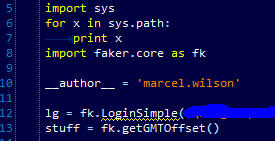
That worked, but now all of the pre-compiled functions found in _faker.pyd are not recognized by the code inspection (introspection?) portion of the IDE. The example image below shows getGMTOffset() is recognized because it is found in the core.py portion of the library (i.e. is not a precompiled function)
I am able to get around this issue with a slight work around. Remove the source from the project and put the environmental variables in the Run/Debug Configuration default.

This feels awkward because the environmental variables are already in the Python Interpreter menu. I would think that should suffice.
Edit: I should point out that I did "Invalidate Caches..." to be sure that wasn't playing a part in this some how.
Attachment(s):
interpreter_paths2.jpg
proj_structure2.jpg
code_inspection.jpg
debug_environment_variables.jpg
Please sign in to leave a comment.
Hello Marcel,
This is a bug in PyCharm which will be fixed in PyCharm 1.5.3. Sorry for
the problems.
--
Dmitry Jemerov
Development Lead
JetBrains, Inc.
http://www.jetbrains.com/
"Develop with Pleasure!"
Works like a (py)Charm in 1.5.3!
I can't express how much I appreciate you and your team. Keep up the excellent work!