OSX shell environment variables

Hi,
I'm trialing PyCharm, which looks excellent, however I can't get the system environment variables to come through in a debug session.
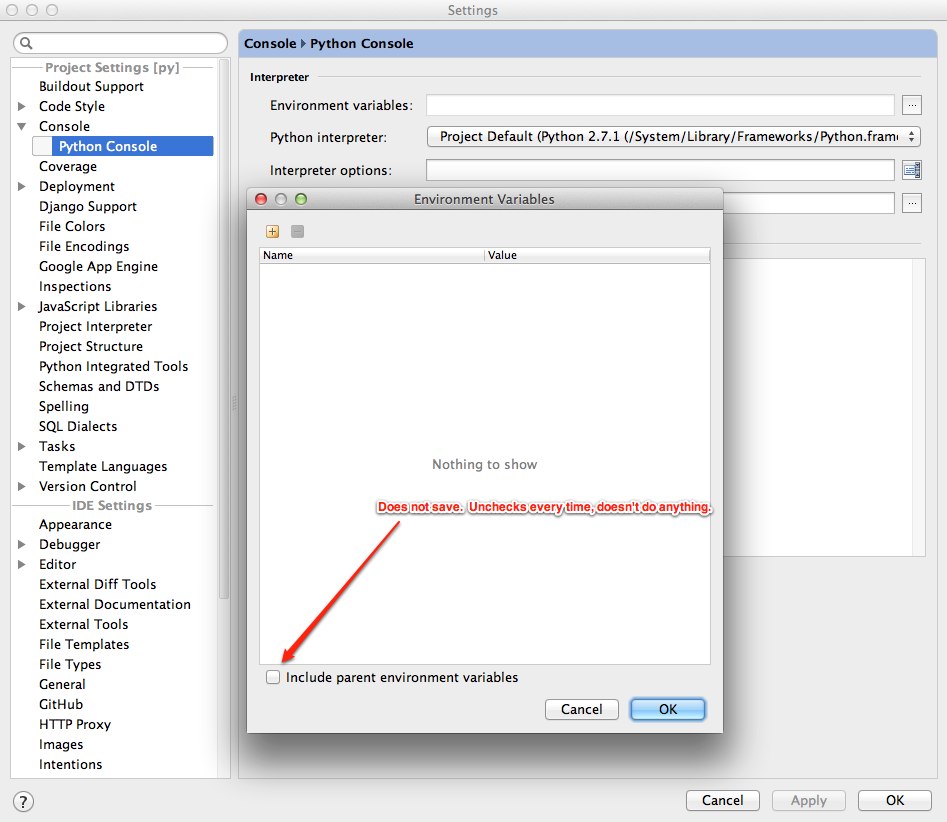
I noticed the "Include parent environment variables" checkbox in the Python Console options, but it doesn't do anything, and it unchecks after I press ok.
Any ideas?
Cheers,
Shane
Attachment(s):
Environment Variables.jpg
Please sign in to leave a comment.
Bump...?
Is there any way to get the bash environment into PyCharm? If not, it's a show stopper for me.
This is not specific to PyCharm at all. If you run PyCharm from bash, it will see the environment variables defined in your bash profile. If you run it from the dock, it will only see the global environment variables defined in environment.plist: http://developer.apple.com/library/mac/#qa/qa1067/_index.html
Ok, so to avoid setting a global .plist, I thought I'd add the environment variables I wanted to the Run/Debug Configuration -> Environment Variables, however I'm not sure how to append/substitute variable names.
e.g. I want to be able to mimic this:
export PATH=$PATH:~/SomeNewPath
How can I do this?
Shane
I don't think this is possible at the moment. You're welcome to file a feature request at http://youtrack.jetbrains.net/
Also, depending on what you're trying to run, you may be able to write a wrapper script that would configure the environment and then run your original program.
Yeah, I agree with the wrapper idea. I'll just make an env.py for debugging purposes only, which sets all the envars, then kicks off the main python class.
Thanks anyway, Dmitry.
Cheers,
Shane
If I understand correctly:
alias pycharm='open /Applications/PyCharm.app'I still don't really understand why ticking the checkbox "Include system environment variables" inside Run/Debug configurations doesn't allow me to use the environment variables if they are even visible in the list? I would understand if they wouldn't be accessible, but PyCharm even sees them! (screenshot attached).
If system environment variables are seen in the run configuration you should be able to use them.
What happens when you run:
import os; print(os.getenv('<some_variable_name>'))
?
Thank you very much for your input Andrey! This worked fine apart from PYTHONPATH, which seems to be overwritten by PyCharm. So I dug a little deeper into it, and found this: https://stackoverflow.com/questions/28326362/pycharm-and-pythonpath
Is there any way. of somehow getting around this feature to allow to use the global system variable PYTHONPATH? I would like to use the modules from the different path without having to always set the path this a way.
There are checkboxes in run configuration:
Have you tried disabling them?
Sure. It seems that PyCharm is overwriting PYTHONPATH even when these options are disabled.
For import os; print(os.getenv('PYTHONPATH'))
I am getting:
/Applications/PyCharm.app/Contents/helpers/pycharm_matplotlib_backend:/Applications/PyCharm.app/Contents/helpers/pycharm_display
Instead of what PYTHONPATH is actually set to.
PyCharm sholudn't overwrite your PYTHONPATH, it's only appending a few interpreter paths. Are you sure it's not "overwritten" by your environment?
Which interpreter do you use? Please run python shell with the same interpreter/environment outside of PyCharm and check the value of PYTHONPATH there.
Then run python console from PyCharm and do the same there. Compare results.