WHILE EXIST give [S1000][4145] error

Hi All,
While connecting to SQL server using SQL Server (jTds) driver I am getting an error for this simple script.
DECLARE @Count INT

WHILE (SELECT COUNT(*) FROM xxxxxx WHERE Instance < '2015-02-28') > 1
BEGIN
  DELETE TOP (100) FROM xxxxxx
  WHERE Instance < '2015-02-28'
  SET @Count = @Count + 1

  IF @Count % 100
  BEGIN
    SELECT 'DELETED', @Count * 100, 'LEFT', COUNT(*) FROM xxxxxx WHERE Instance < '2015-02-28'
  END
END
The error is
[S1000][4145] An expression of non-boolean type specified in a context where a condition is expected, near 'BEGIN'.
I have tried to change the condition in multiple different ways.
Normally I would do
WHILE EXISTS(SELECT 1 FROM xxxxxx WHERE Instance < '2015-02-28')
BEGIN
END
That failed so tried the above.
Here is MS description of WHILE loop
https://msdn.microsoft.com/en-GB/library/ms178642.aspx
Here is T-SQL standard description of WHILE loop
http://www.cs.rtu.lv/PharePub/Teach%20Yourself%20Sql%20In%2021%20Days%202nd%20Edition/ch19/ch19.htm
Normally I would use set based commands but I am trying to limit the amount and duration of locks required during delete.
This in build #DB-143.1411
This type of operation worked fine in earlier versions of 0xDB0
Any suggestions on how to create the the WHILE condition?
Regards
Richard....
Please sign in to leave a comment.
On an off chance it was something to do with parsing of the WHILE conditions I rewrote the script as
DECLARE @Count INT
DECLARE @Left INT
SELECT @Left = COUNT(*) FROM xxxxxx WHERE Instance < '2015-02-28'
WHILE @Left > 1
BEGIN
DELETE TOP (100) FROM xxxxxx
WHERE Instance < '2015-02-28'
SET @Count = @Count + 1
SELECT @Left = COUNT(*) FROM xxxxxx WHERE Instance < '2015-02-28'
IF @Count % 100
BEGIN
SELECT 'DELETED', @Count * 100, 'LEFT', @Left
END
END
It still gave the same error.
Hello Richard,
Do you get this error when executing the script? I think the error is not related to DataGrip functionality as IDE in this case does only send the instructions to SQL Server to execute.
Hi Andrey,
Just check all 3 statements in Microsoft SQL Management Studio and they ran fine. So I don't think the problem is with the statements, maybe the driver?
Regards
Richard...
How are you executing the script in DataGrip: are you executing all statement or some part of it? Does it help if select all and execute it? Check also these options:
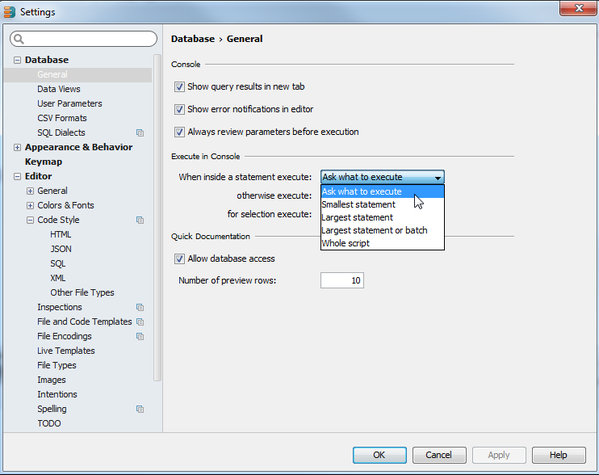
I execute the script as whole or selected all statements, so all statements are sent as a single batch.
![]()
Here is the settings dialog.
Attachment(s):
Screen Shot 2016-01-11 at 11.26.11.png
Check first that