Show me the usages!

IDEA can show usages of the element at the caret with CTRL-SHIFT-F7. You can enable an option to do this automatically, under Settings → Editor → 'Highlight Usages of element at caret'.
You can then see all usages of the current identifier:
This feature has been extended in the Scala plugin to certain keywords.
We use this to show you the result expression if you select 'if', 'match' or 'case'


Choose 'for' to see the yielded expression.
Choose 'def' or 'return' for all the return expressions from a method:
Choose '=>' for the result expression of an anonymous function: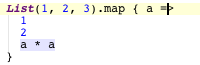
You can also select 'class', 'object', or 'trait' to highlight the statements that are part of the constructor, that is val/var definitions and other expressions. (This highlighting will require a nightly build > 26.03.2011 with IDEA 10.5 EAP)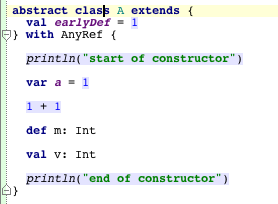
Please sign in to leave a comment.
That's very useful, thanks!
In which version of the plugin is this implemented?
Highlighting the constructor was just implemented today.
Highlighting the def/return has been around for a long time.
The rest was done on 13 May, so post build 688.
Jason, this is a nice feature, thanks.
Will subsequent builds target 10.5 EAP only, or will there be parallel releases for 10.0.x as well?
-tt
Not sure, that's up to Pavel and Alexander.
The feature is great! We'll include it in the upcoming stable build for IDEA 10.5, but it won't appear in 10.0.x versions of the plugin (we've already reconfigured build server to use IDEA 10.5 as a dependency).
The highlightings that Jason added are quite useful.
Original request still stands though: "show implementing methods" (http://youtrack.jetbrains.net/issue/SCL-2910) ;)
I have to say that the plugin is getting quite nice to use. A bit of smart completion here and there, and it's starting to work quite well.
-tt