PyCharm 2016.1.2 (or latest rc) not rendering reStructuredText

This was working a few weeks ago. I'm not sure if this is on my end, or an issue with the software. When I click on a function or method, hit ctrl-Q to bring up Quick Documentation, it doesn't appear that the Quick Documentation dialog is recognizing my docstrings as reStructuredText. What it does render is plain text, and all the parameters are missing. This is in PyCharm 2016.1.2. 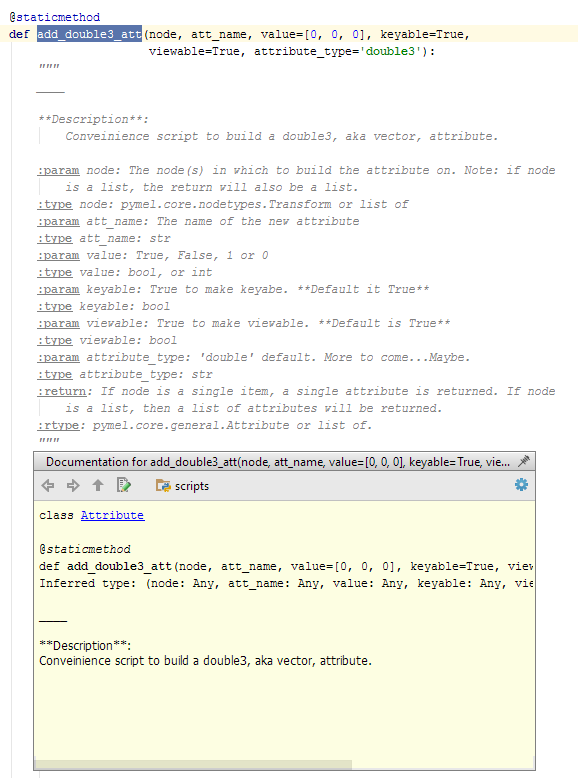
I downloaded the latest PyCharm release candidate 145.969.10, but still getting the same behavior. I also removed my PyCharm 2016 settings in my c:\users\<username> so that PyCharm would regenerate to default settings. In both versions, I ensure the following settings (see image), but still no luck. I removed settings again, and imported my settings from PyCharm 5 which does properly render the docstrings, and 2016.1.2 is still not rendering them proerply.
I've been beating my head on this, and lost way too much time. All works fine in PyCharm 5 which is what I'm falling back on.
-Paul
Please sign in to leave a comment.
Paul,
Could you include an example of the rendering working? I thought something looked off when I used ctrl-q, but couldn't quite remember.
Here is a working docstring in PyCharm 5 from the same method.
same problem here with 2016.1.4
I've been communicating with JetBrains back and forth about this issue, and they discovered why it's not working in my case, and they said it will fixed in the "next bugfix release of PyCharm". I got an email with a temp fix about 20 minutes ago.
The reason why I was having issues is because I have set my PYTHONPATH environment variable in Windows. My understanding is, If the PYTHONPATH environment variable exists when PyCharm starts, PyCharm will likely have issues rendering ReStructuredText. The work-around until the problem is resolved in PyCharm is to add specific paths to your PYTHONPATH environment variable. Since I'm using python 2.7, I needed to add these:
I'm asuming if you're using Python 3.x, you'll need to add
Cheers,
Paul