you can try to create run configuration using Rails run configuration, in case it will not help you always have plan B: use Ruby run configuration to run the server (unfortunately, I know nothing about Cramp generator and how it is supposed to run webserver for it so I can not provide step-by-step solution :()
I've tried a Rails config, but that complains that there is no "Rails server launcher" in the project. The Ruby configuration seems more likely, but I'm not sure what combination of settings I need. From a terminal I normally cd to the project's folder and run
OK, for those who follow, I found a way to launch thin for debugging my non-rails project. In short, I used a Ruby configuration, with thin itself as the ruby script. Longer version: I used the Tools>Show Gem Environment tool to see where thin was installed, then used that to guide me to the actual thin script. I then entered that full path into the "Ruby script" field of a Ruby configuration. I entered the usual command line arguments, plus "-D" for debug mode, into the script arguments field. And finally I enabled the "bundler exec" checkbox on the Bundler tab.

If it can be launched using ./script/server - RubyMine should also support it.
At the moment when ever I click on Run RubyMine loads WEBrick. How do I get RubyMine to boot Thin instead?
Cheers
Richard
Hi Richard,
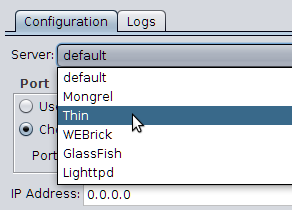
Are options for choosing custom server available?
Regards,
Oleg
I have the same question, but with the qualification that my project is not a Rails project; it was generated by the Cramp application generator.
you can try to create run configuration using Rails run configuration, in case it will not help you always have plan B:
use Ruby run configuration to run the server (unfortunately, I know nothing about Cramp generator and how it is supposed
to run webserver for it so I can not provide step-by-step solution :()
Regards, Oleg.
I've tried a Rails config, but that complains that there is no "Rails server launcher" in the project. The Ruby configuration seems more likely, but I'm not sure what combination of settings I need. From a terminal I normally cd to the project's folder and run
The config.ru file is in the root of the project.
OK, for those who follow, I found a way to launch thin for debugging my non-rails project. In short, I used a Ruby configuration, with thin itself as the ruby script.
Longer version:
I used the Tools>Show Gem Environment tool to see where thin was installed, then used that to guide me to the actual thin script. I then entered that full path into the "Ruby script" field of a Ruby configuration.
I entered the usual command line arguments, plus "-D" for debug mode, into the script arguments field.
And finally I enabled the "bundler exec" checkbox on the Bundler tab.