How to add description to Annotator?

Hello,
if implementing a LocalInspectionTool I can use getStaticDescription. This way I can press (Ctrl+F1) and see a more extended explanation of the hint in the editor.
public class MyLocalInspectionTool extends LocalInspectionTool {
     // ...
     public String getStaticDescription() {
          return "my desc";
     }
     // ...
}
The result in editor looks like this: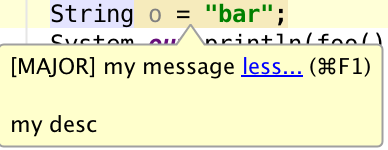
If implementing ExternalAnnotator I specifiy a tooltip like this:
Annotation annotation = holder.createWarningAnnotation(textRange, message);
annotation.setTooltip(message);
The result in editor then looks like this: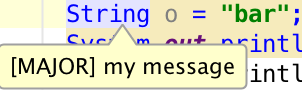
But I would like to provide a description as well and use Ctrl+F1 to open it (Note: the descripton can be very long 20+ lines with code examples, putting it into the message is not an option)
Is there a way to add the "Description Functionality" to an Annotation without using the LocalInspectionTool ?
Thank you.
Please sign in to leave a comment.
No, annotator is not designed for additional long descriptions.
This was a fast answer, Thank you!
IntelliJ calls this method if hover mouse over an annotation:
But it fails to call the dressDescription(editor):
because myCurrentWidth is -1 (always)
dressDescription seems to contain the logic for showing the description.
Really no way to provide something like my own implementation of TooltipLinkHandlerEP ?
You seem to dig deep in the code :)
Well, the functionality you request was not designed. If you find some hacky way to get it - you are lucky.
looking deep into intellij code and stress google is most normal in the live of a intellij plugin developer, isn't that so? ;)
After googling and looking at LocalInspectionsPass I came up with following code fragment:
additionaly I had to register the linkHandler in the extensions section of plugin.xml:
which at the moment has no logic:
It seems to work, but I found a minor issue :
If I use the shortcut (Ctrl+F1), then the annotation disappears instead of get expanded, but only first time.
If I get managed to click on the "more..." or use the shortcut on any other inspection at least once, then it starts working on my annotation as well.
Any ideas what I am missing to get the shortcut working also at first time?
small update:
at first time IntelliJ executes:
ShowErrorDescriptionAction#changeState
but following condition fails:
private static void changeState() {
    if (Comparing.strEqual(ActionManagerEx.getInstanceEx().getPrevPreformedActionId(), IdeActions.ACTION_SHOW_ERROR_DESCRIPTION)) {
      shouldShowDescription = descriptionShown;
    } else {
      shouldShowDescription = false;
      descriptionShown = true;
    }
  }

// ActionManagerEx.getInstanceEx().getPrevPreformedActionId() is always null
If execute the same shortcut action on some other code inspaction (in my case it was "package name mismatch")
then intellij execute a different class LineTooltipRenderer
and
If again execute the same shortcut on my own annotation, then the last one is used and ShowErrorDescriptionAction is not invoked any more.
Very strange.
UPDATE: works fine, I just failed to click into the editor and get the focus.