Use SpacingBuilder to get rid of blank lines?

Hallo,
I'm using AbstractBlock and FormattingModelBuilder to format my files, all according to the tutorial http://confluence.jetbrains.com/display/IntelliJIDEA/Formatter
A snippet of my file looks like this:
A_FEATURE_VALUE {
en a cool name, another cool name
de a german name
}
I want the blank line between "a german name" and the closing bracket to be removed. In the spacing builder I create in my FormattingModelBuilder i tried the following:
return new SpacingBuilder(settings).between(SOLTypes.ALTERNATIVE_NAME, SOLTypes.CLOSING_BRACKET).blankLines(0);
However, the blank line stays.
Actually I don't even want the linebreaks and whitespaces to be part of SOLTypes.LANGUAGE_DEFINITION, but I had to allow it in my grammer definition cause otherwise errors occured when there was a whitespace or newline -> different topic.
Thanks for any help,
Sebastian
Please sign in to leave a comment.
The formatter requires all whitespace and line break nodes to have the type PsiWhitespace. In your case, it's something else (SOLTokenType.CRLF).
Thank you Dimitry, I didn't think about that. However, reformat code does still not replace the blank lines. Now my tree looks like this:
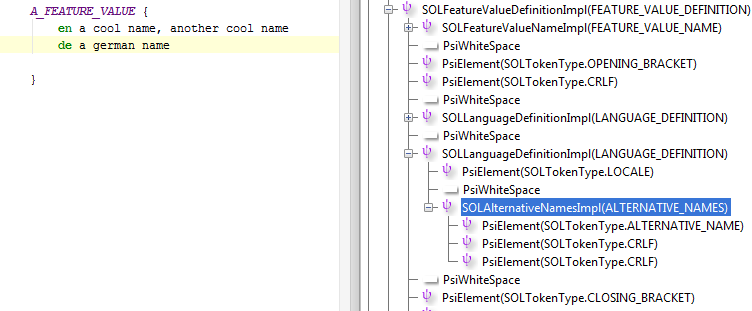
Is there an additional option I have to define? I thought the formatting engine automatically calculates the smallest number of needed whitespace?
So what's the difference between the two screenshots? I still see CRLF nodes there.
Also, there is an option in the code style settings for the maximum number of blank lines to keep, and the blankLines() method honors that option. If you don't want to honor it, you can use the spacing() method with 5 parameters and pass 0 as the keepBlankLines parameter.
Ok I did it the ugly way by calling spacing(). Is it right that the general CodeStyleSettings do not offer "MAX_BLANK_LINES"? So if I would do it correctly I had to register my own CodeStyleSettings?