Action shortcut not being displayed

Hi all,
In my plugin I register an action group in which I register four actions. They're all defined in exactly the same way in the plugin.xml, but one of them doesn't have its shortcut key displayed in the menu item. The other actions all display correctly. The shortcut key defined in the plugin.xml does actually work, though. Is there anything obvious I should check for this?
Thanks,
Colin
Please sign in to leave a comment.
Hi Colin,
Post a problematic snippet please.
Sure, I was also going to paste a screenshot but it seems to be a sporadic problem. One of my users sees it pretty much constantly, I saw it last night but I can't see it now. This is the plugin.xml snippet:
<group id="Scheme.REPL.Group"
text="Scheme REPL" description="Scheme" popup="true">
<action id="schemely.repl.actions.LoadSchemeFileInConsoleAction"
text="Load file in REPL">
<keyboard-shortcut keymap="$default" first-keystroke="ctrl shift L"/>
</action>
<action id="schemely.repl.actions.RunSelectedTextAction"
text="Run selected text in REPL">
<keyboard-shortcut keymap="$default" first-keystroke="ctrl shift J"/>
</action>
.... more similar actions ...
<add-to-group group-id="ToolsMenu" anchor="last"/>
</group>
Only the first action is problematic, the others all work fine. The actions are all implemented in the same way.
Here's a screenshot of the issue as well - I had to get a user to send me this because it's sporadic and difficult to reproduce. I think it always happens for him though:
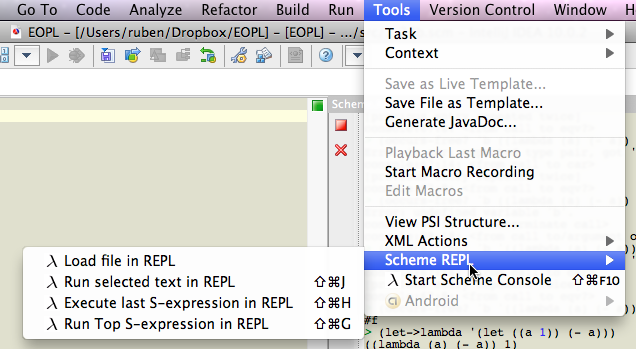
May be he just reset it? Could you ask him to check an keymap settings for the action?
I can ask him again, but I did check that, he said he just installed the plugin in a stock 10.0.2, no modifications. I also see this from time to time and I don't bind and unbind the keys.
Well, unlike to other shortcuts in a group the first one (Ctrl-Shift-L) is used by a core IDEA (Search - Find Previous). There just may be some sort of conflict.
Ok, I'll see if I can find a better group of shortcut keys. Thanks!