How to run tasks in foreground after sending them to the background?

I clicked on the background button on the progress indicator which made the task run in the background.
I want the progress indicator to show again but I can't seem to find anyway to do so.
Anybody know how to do this?
Please sign in to leave a comment.
Window->Background Task->Show
or click in the status bar of window
非常感谢,你解答了我的问题。
I only see this when I did what you suggested...
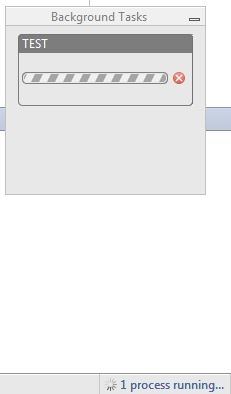
I can't get the progress indicator to show up even if I click the background task.
The window with "TEST" does have a progress indicator? How does it look like before?
Similar to the one here, https://www.jetbrains.com/idea/webhelp/working-with-background-tasks.html
I see, once you send such a progress to "Background" it will always appear as you described, this is intended behavior (it will never go back to "modal" dialog)
There's no workaround for this (or possibly a hack)?
Not that I know of. Why do you need this functionality?
Well, I'm trying plugin development with IntelliJ and I just want to see that the progress bar appears when I need it to.
It makes me more aware that the action I wanted to happen actually happened (I guess it's just a personal preference).
You could always show a notification upon finishing the background task.
Exit IDEA and edit the file .idea/workspace.xml. You'll notice the following section:
<component name="AnalysisUIOptions">
<option name="ANALYSIS_IN_BACKGROUND" value="true" />
</component>
Change the value of "true" to "false" and restart IDEA. That should do the trick. Remember to first exit IDEA entirely before making the change to this file though. As this is not a documented feature as far as I know, I recommend you try this at your own risk.It worked just fine for me.