Unable to debug a Gradle/Groovy project.

I'm using Gradle to build a Groovy project and I'm unable to configure either Gradle or InteilliJ IDEA appropriately to allow me to debug the project. I've created a barebones project exhibiting the behavior when running a simple test case.
My project builds and tests execute successfully, but if I set a breakpoint in either of the 2 lines of executable code and use the settings below for remote debug, it doesn't work. IDEA connects successfully but never stops execution.
Please help.
The example code is at https://github.com/clstokes/gradle-groovy-debug-test.
My gradle environment is:
------------------------------------------------------------
Gradle 1.2
------------------------------------------------------------

Gradle build time: Wednesday, September 12, 2012 10:46:02 AM UTC
Groovy: 1.8.6
Ant: Apache Ant(TM) version 1.8.4 compiled on May 22 2012
Ivy: 2.2.0
JVM: 1.7.0-u10-b09 (Oracle Corporation 23.6-b03)
OS: Mac OS X 10.8.2 x86_64
My build.gradle looks like this:
apply plugin: 'idea'
apply plugin: 'groovy'

repositories {
  mavenLocal()
  mavenCentral()
}

dependencies {
  groovy(
      "org.codehaus.groovy:groovy:2.0.5"
  )
  testCompile(
      "org.testng:testng:6.8"
  )
}

test {
  useTestNG()
}
I set GRADLE_OPTS as the following:
export GRADLE_OPTS="-Xdebug -Xrunjdwp:transport=dt_socket,server=y,suspend=y,address=5005"
And my debug configuration in IDEA looks like this: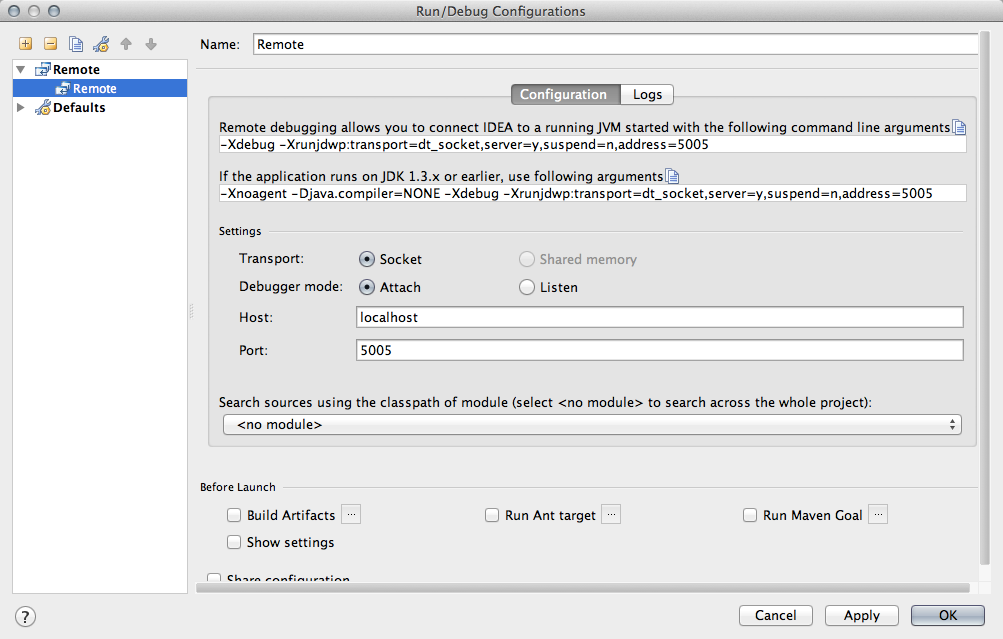
Please sign in to leave a comment.
Hi Cameron,
Am I right assuming that you want to debug gradle task execution?
Denis
Yes, sorry that wasn't clear. Specifically I'm wanting to debug my test cases with 'gradle test', but would want to use it for other tasks such as jettyRun and others.
You can just run and debug gradle build from the IDE. I've created a small screencast which illustrates that - https://dl.dropbox.com/u/1648086/video/debug-gradle.m4v
Denis
Hi, Denis.
I am able to debug gradle out of the box with IDEA 12. However, it doesn't work with IDEA 13.
Do you know whether it's still relevant for IDEA 13?
Thanks,
Vladimir
@Denis Zhdanov
The link you provided no longer works.