Configuration Problem (IDEA Noob) - Canot Resolve Symbol 'swing'

I am a PHP developer, working on a pluging for PHPStorm. I successfully configured IDEA on Friday and built my plugin. However, this morning I updated my Java 7 JDK and while doing so realized that I had a Java 6 JRE still installed, so I removed that. Now, I am getting import errors. I was getting these errors on Friday, but somehow figured out the Project settings and got it working. Now, I'm stuck.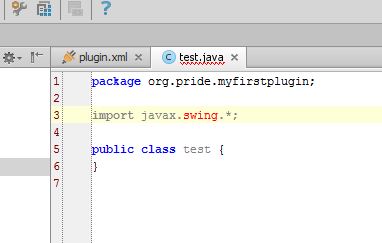
Please sign in to leave a comment.
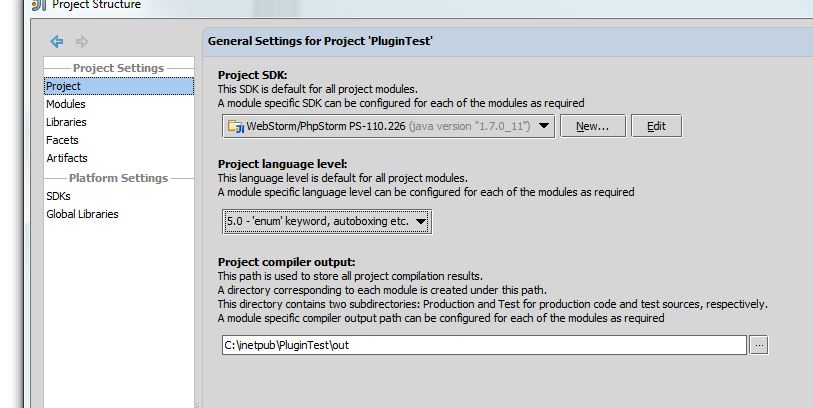
Ok, I think I found the problem, but not sure how it happened. Project language level was set to 1.4 - 'assert' keyword. I changed this to 5.0 - 'enum' keyword, autoboxing, etc. and now the import errors are gone. What should this be set to?
Actually, at 5.0, I still have some other warnings. At 7.0 or 8.0, no warnings.
However, my .ipr file is now modified. Apparently, I was using the setting 1.4 on Friday and this was working. How is that possible?
Now, I am getting all of these Unchecked call warnings. What does that mean? Why wasn't I getting those before?
Is the path to the jdk correctly set? You can check this in the Global SDKs afaik
That part is now working, yes it was, the Project Language Level was the issue (but that was not changed and it worked fine on Friday.)