HTML Formatting - Weird Intenting and Code Reformatting

I'm sorta new to IntelliJ and I'm having a rough time editing existing HTML documents.
It seems as if moving lines of code around in the document causes the tab intenting to change, often messing up the nesting of tags.
This was especially bad when the Reformat On Paste option was selected. Since I turned that off, I have less trouble with this. However, it seems like IntelliJ does not handle nested tables very well.
I have tried to begin my work with a Reformat command, so IntelliJ can take control of the formatting, but even when I do this, the code will still get the intenting changed as a I copy lines, move lines up and down, or paste in code.
Often it will change a a line intented with 4 tabs, to a line with 1 tab and 1 space. I feel like I'm spending way too much time reformatting code, and not enough time writing it.
I'm happy to provide any additional information needed to help track down either the source of the issue, or the correct settings I can use to improve the formatting/reformatting of my code.
DW
Please sign in to leave a comment.
Hi Dan,
I definitely need more information:
1) Intellij IDEA version,
2) Current code style settings,
3) An example of what doesn't work (a relatively small HTML file where the problem occurs would be perfect),
4) Some steps to reproduce the problem.
Right now I don't see any major issues. Yes, HTML tags are indented on paste or when I move lines but HTML file remains correct. Of course submitting an issue in YouTrack doesn't make any harm even if it eventually will be closed as "won't fix".
Thanks!
1) Intellij IDEA version -> 11.2 Build IU-117.418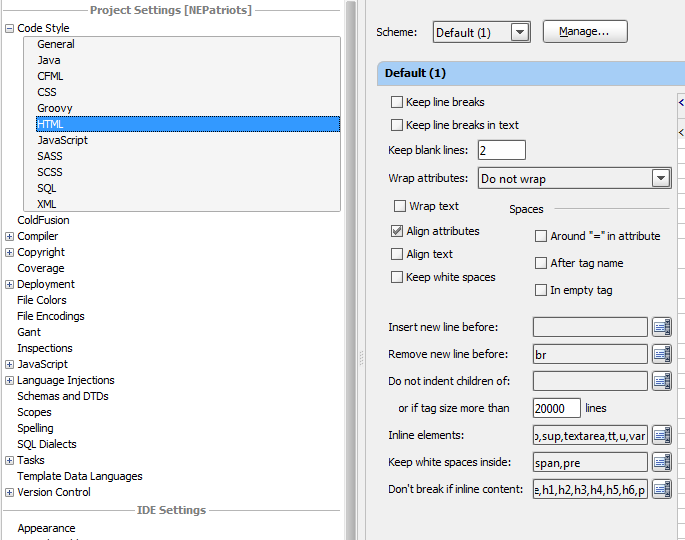
2) Current code style settings -> Image Inserted. If you need more, I attached the settings.jar from an export.
3) An example of what doesn't work (a relatively small HTML file where the problem occurs would be perfect),
Here are some screen captures:
4) Some steps to reproduce the problem.
The steps are shown in both screencasts. Let me know if this is helpful or you need more examples:
Attachment(s):
settings.jar