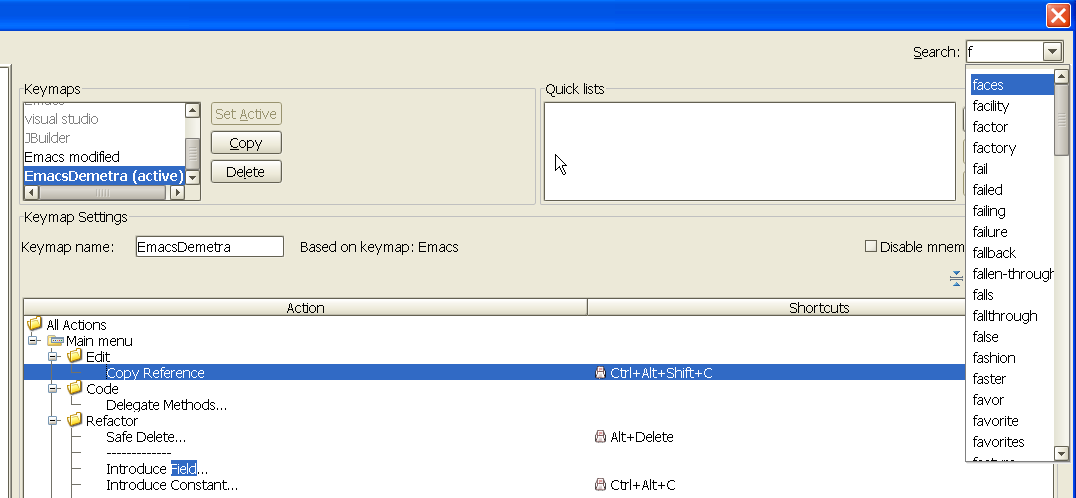
5181 - Settings - dropdown box on the search box blocks typing.

I like the search box, but the dropdown box which gives a list of choices is a pain in the @#$%. (5181, Windows XP SP2)
See attached picture. I was trying to type "find", but as soon as I hit "f", the dropdown box appeared. That would be ok, but it also blocked input so I couldn't finish typing "find". I had to hit ESCAPE and then continue. But often it would pop up again before I finished and I had to hit ESCAPE again.
One time I got frustrated with it and hit ESCAPE once too many times, and the Settings dialog was closed and I lost my changes I had made to my Keymap.
Can you please fix this so it doesn't block input? The focus should not change from the textbox to the dropdown menu.
Other issues:
1) The KeyMap Tree doesn't reset if you clear the search term.
2) The KeyMap Tree should be expanded by default when searching.
3) If I had entered a search term, and then attempted to change the Keymap,
IDEA acted really wierd. It used alot of cpu% and appeared to hang for a minute.
Maybe some interaction between changing the KeyMap tree to another keymap while a search filter is in effect?
Searching the KeyMap could use some additinal featues:
1) I wasn't able to search by keybinding, e.g. all actions bound to CTRL+W.
The DescribeKey plugin allows you to enter a keystroke and then see what actions
are bound to it. It would be nice if that was integrated into Demetra also
Attachment(s):
5181_ide_settings.png
Please sign in to leave a comment.
+1
Blocking drop down list fixed
http://www.jetbrains.net/jira/browse/IDEADEV-4897
Wait for next EAP
Hello Alex,
Fixed.
We'll check it ...
Isn't it?
Keymap is very slow indeed. We are working on it.
There is such feature already. There is a filter which allow to filter on
keystrokes as well as 'text' filters.
Thank you.
-
Anna Kozlova
JetBrains Inc.
http://www.intellij.com
"Develop with pleasure!"