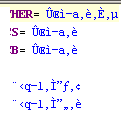
i18n display broken in property files in 3354

Japanese characters can't be correctly display in the
property file editor. While other places like java
file edit and javascript edit, that's OK.
Attachment(s):
a.gif
Please sign in to leave a comment.
In the upcoming build, goto Settings|Editor|Properties file encoding and
setup your charset there.
--
regards,
--
Alexey Kudravtsev
Software Developer
JetBrains, Inc, http://www.jetbrains.com
"Develop with pleasure!"
"mytele" <no_mail@jetbrains.com> wrote in message
news:28457158.1118195314859.JavaMail.itn@is.intellij.net...
>
>
>
Alexey Kudravtsev (JetBrains) wrote:
Alexey - when can we expect this build?
Thanks for your reply.
We do expect every next release.
It works in 3370. Great job!