This means someone else on your network is already using the same license as you. Maybe you're using a commercial license and you forgot your notebook running IDEA connected to the same network?
thanks for the info. strange. IDEA used to tell directly that "someone else on the network is using same license", then I could either shutdown or "reactivate" IDEA. Now there is only this popup, which appears twice, then IDEA continues normally.
I'm connected to the office via VPN - if I leave IDEA open in the office I might get this message I guess.
IDEA used to tell directly that "someone else on the network is using same license", then I could either shutdown or "reactivate" IDEA.
Hmm, I haven't seen this dialog for some time now... It's just that the "license with unique name" rang a bell, but maybe you're right and this is a different thing.

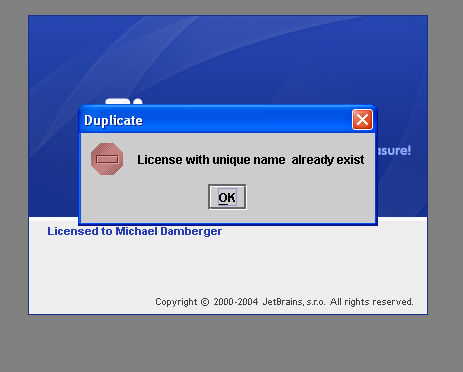
This means someone else on your network is already using the same license as you. Maybe you're using a commercial license and you forgot your notebook running IDEA connected to the same network?
thanks for the info.
strange. IDEA used to tell directly that "someone else on the network is using same license", then I could either shutdown or "reactivate" IDEA. Now there is only this popup, which appears twice, then IDEA continues normally.
I'm connected to the office via VPN - if I leave IDEA open in the office I might get this message I guess.
M.
Hmm, I haven't seen this dialog for some time now... It's just that the "license with unique name" rang a bell, but maybe you're right and this is a different thing.