Build 3075 - good code red

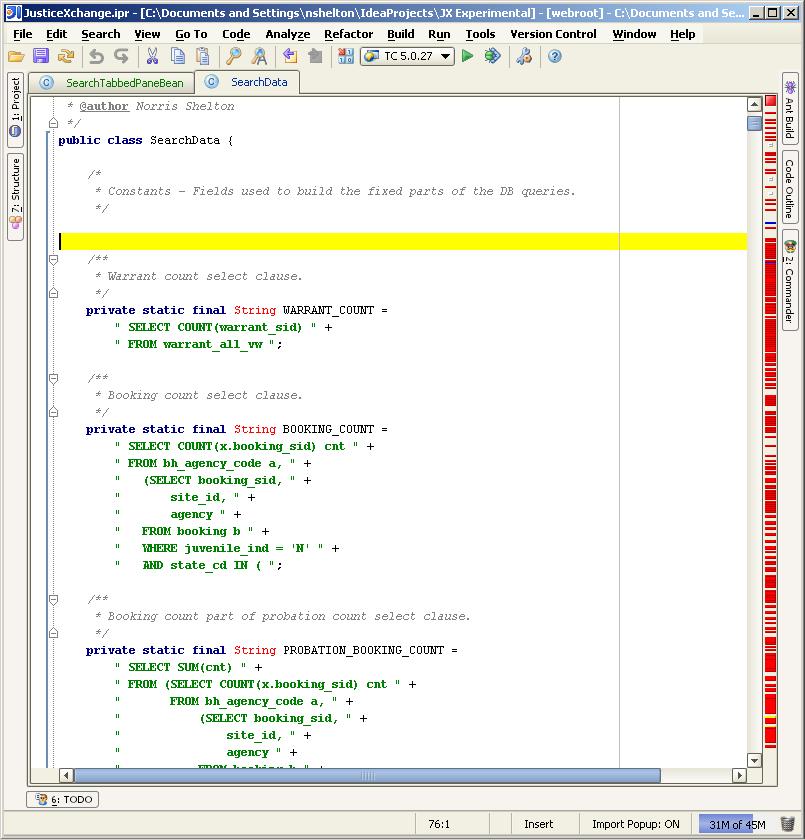
Everything was working OK. I did have to re-open the project in 4.5.2.
I have changed the L&F to allow (already had errors) and removed the
YourKit flag. It compiles correctly and the JDK is set correctly (even
tried changing it).
--
Norris Shelton
Sun Certified Java Programmer
Attachment(s):
moz-screenshot-7.jpg
Please sign in to leave a comment.
Hi,
Looks like JDK is not set properly
Norris Shelton wrote:
--
Best regards,
Maxim Mossienko
IntelliJ Labs / JetBrains Inc.
http://www.intellij.com
"Develop with pleasure!"
I even changed it to another JDK. No change. I will try redefining the
JDK.
Norris Shelton
Sun Certified Java Programmer
Maxim Mossienko wrote:
>
>
>
>> Everything was working OK. I did have to re-open the project in
>> 4.5.2. I have changed the L&F to allow (already had errors) and
>> removed the YourKit flag. It compiles correctly and the JDK is set
>> correctly (even tried changing it).
>>
>>
>> --
>> Norris Shelton
>> Sun Certified Java Programmer
>>
>>
>
>
I redefined the JDK, redefined the project, but used the existing
module. No change.
Norris Shelton
Sun Certified Java Programmer
Norris Shelton wrote:
>
>
>
>
>
>
>> Hi,
>>
>> Looks like JDK is not set properly
>>
>> Norris Shelton wrote:
>>
>>> Everything was working OK. I did have to re-open the project in
>>> 4.5.2. I have changed the L&F to allow (already had errors) and
>>> removed the YourKit flag. It compiles correctly and the JDK is set
>>> correctly (even tried changing it).
>>>
>>>
>>> --
>>> Norris Shelton
>>> Sun Certified Java Programmer
>>>
>>>
>>
>>
Baffling.
I redefined the project, module, and selected another JDK. Still
doesn't work for the editor but compiles correctly. I even followed the
intention to setup the JD. Still doesn't work.
Norris Shelton
Sun Certified Java Programmer
Norris Shelton wrote:
>
>
>
>
>
>
>> I even changed it to another JDK. No change. I will try redefining
>> the JDK.
>>
>> Norris Shelton
>> Sun Certified Java Programmer
>>
>>
>>
>>
>> Maxim Mossienko wrote:
>>
>>> Hi,
>>>
>>> Looks like JDK is not set properly
>>>
>>> Norris Shelton wrote:
>>>
>>>> Everything was working OK. I did have to re-open the project in
>>>> 4.5.2. I have changed the L&F to allow (already had errors) and
>>>> removed the YourKit flag. It compiles correctly and the JDK is set
>>>> correctly (even tried changing it).
>>>>
>>>>
>>>> --
>>>> Norris Shelton
>>>> Sun Certified Java Programmer
>>>>
>>>>
>>>
>>>
Ridiculous question, but - after all the changes - have you tried to quit IDEA,
remove all the system caches and restart IDEA?
r.
Norris Shelton wrote:
Ridiculous question? WTF, you think I'm a moron or something? :-P
Of course I didn't delete the caches or anything like that. :-[
I deleted the caches and a few other things and it now works. Thx.
Norris Shelton
Sun Certified Java Programmer
Richard Nemec wrote:
>
>
>
>> Still doesn't work.
>