Build 1101 Project Path Order Bug

This appears to be a bug at 2 ends.
Senario 1:
1. Create project (ProjectA) and include a library (i.e. JUnit 3.7)
2. Save the project.
3. Create another project, delete JUnit 3.7 library, and add a JUnit 3.8
library.
4. Open the ProjectA and look on the order tab.
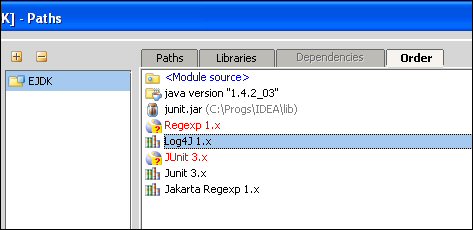
Issue: the original JUnit 3.7 library entry is still there, displays in
red, and there doesn't appear to be a way to remove it. (see attached
image for a reference)
Senario 2:
1. Import an old project from IDEA 3.x with an old library reference.
2. This creates the same end result as senario 2.
Anyone else see this?
Attachment(s):
IDEAError_Order.jpg
Please sign in to leave a comment.
Yep, just reported it an hour ago:
http://www.intellij.net/tracker/idea/viewSCR?publicId=26677
Andrei
"Leif Ashley" <leifashley@yahoo.com> wrote in message
news:opr1turzw129extk@news.intellij.net...
>
>
>
>
I noticed that and put a bug in for the last build, but apparently it's been bugged before and it's actually a feature ...
http://www.intellij.net/tracker/idea/viewSCR?publicId=24828
The other library bug I've found (and reported) is that if you create a project lib in one module and switch to another module the lib doesn't appear automatically. You can hit the "edit" button and press "ok" and it will reload though. Here's the link ...
http://www.intellij.net/tracker/idea/viewSCR?publicId=26235
I hope this isn't a feature as well ;)
Yes, I have run into this for both libraries and modules. I don't think
I filed an issue however since I had bigger problems at the time.
Leif Ashley wrote:
As per http://www.intellij.net/tracker/idea/viewSCR?publicId=24828, I
agree with the solution of "provide a way to remove invalid order entries".
Thanks for the reply, and thanks to whoever added the ability to remove
plugins that crashed on startup. I was having those problems as well.
>
>
>> This appears to be a bug at 2 ends.
>>
>> Senario 1:
>> 1. Create project (ProjectA) and include a library (i.e. JUnit 3.7)
>> 2. Save the project.
>> 3. Create another project, delete JUnit 3.7 library, and add a JUnit 3.8
>> library.
>> 4. Open the ProjectA and look on the order tab.
>>
>> Issue: the original JUnit 3.7 library entry is still there, displays in
>> red, and there doesn't appear to be a way to remove it. (see attached
>> image for a reference)
>>
>> Senario 2:
>> 1. Import an old project from IDEA 3.x with an old library reference.
>> 2. This creates the same end result as senario 2.
>>
>> Anyone else see this?
>
>
--
Using M2, Opera's revolutionary e-mail client: http://www.opera.com/m2/