Font Size / Zoom In Webstorm 10

I am unable to find the settings for font size, or to enable CTRL-mouse wheel zoom in Webstorm 10. At 1920X1080 on my laptop, the text is rather small. Previously I could zoom it with CTRL-mousewheel, but it no longer works.
Please sign in to leave a comment.
Hi there,
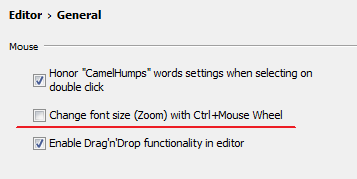
Settings/Preferences | Editor | General
Alternatively just increase editor font size permanently at "Settings/Preferences | Editor | Colors & Fonts | Font"
NOTE: if you use one of the bundled color schemes then you will have to create your own copy ("Save As..." button) before you will be able to make such changes.
How to reset zoom (back to the regular font size)?
@Evgeni Nabokov
You can assign custom shortcut to "Editor Actions | Reset Font Size" action in your Keymap and use it at any time:
You can also call that action directly via "Help | Find Action..."