How do I highlight my inline script with type="text/javascript-lazy" as if it were javascript?

Hey,
In my projects I have to "hide" my inline javascript from Angular.js by renaming it.
How can I still have Syntax-Highlighting etc. as if the type would be just text/javascript?
Regards,
Claas M.
Please sign in to leave a comment.
Hi there,
Please provide some sample that can be copy-pasted.
You mean an example scenario?
Here, the <script> part is not highlighted as JavaScript, because the type is javascript-lazy and I cant change the type to javascript (for unrelated reasons).
But I still want it to be highlighted as if the type were text/javascript.
Like so:
How can I achieve that? I hope you understand what I mean.
P.S Inserting HTML code didn't work on this forum
Sure. Create custom Language Injection rule for that:

NOTE that such fragments with custom injected language will have some backgound color (light green using Default color scheme).
Work fine for me. See below -- standard functionality (text copied from IDE using colors of my current color scheme)
My Language Injection Settings doesn't have an XPath Condition Input field:

Why is that? I'm using Webstorm 10.0.4
The one that I've used is of "XM Tag Injection" while you did "Generic JS"
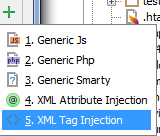
"Generic JS" is for rules that will be used inside JavaScript fragments only while you need injection into <script> tag .. which is HTML/XML
Ah okay. Works now, thanks :)
How can this be done if XPath plugin is no more compatible with recent versions of IntelliJ?
XPath plugin is bundled with IDEA and is definitely compatible with it...
But "XPath condition" field is inactive in my case. Should I enable it somehow?
Please provide comnfiguration screenshot and idea.log (https://intellij-support.jetbrains.com/hc/en-us/articles/207241085-Locating-IDE-log-files)
Config screenshot:
The XPath fields looks OK but I can't enter there anything (it's inactive, in fact).
Thanks. PyCharm doesn't bundle XPath plugin (https://youtrack.jetbrains.com/issue/PY-2214), and a third-party XPathView + XSLT-Support plugin (https://plugins.jetbrains.com/plugin/237-xpathview--xslt-support) is targeted for Idea only and outdated (you will see messages like "Plugin 'XPathView + XSLT-Support' can't be loaded because: Plugin does not include any module dependency tags in its plugin.xml therefore is assumed legacy and can be loaded only in IntelliJ IDEA" if you inspect your log)
So there is no way to get this working? :(
Yes:(
So its 2020, and this is all documented for PhpStorm 2020.2 but it does not work ... XPath Plugin is enabled, settings seam as described, What am I missing?
answer: namespace matters a lot: phpstorm only suggest http://www.w3.org/1999/xhtml but it needs to be exactly http://www.w3.org/1999/html
and now it works: