PHP injection into a Javascript file

Hello,
I'm sure this must be possible, but I can't seem to figure out how to set this up (PhpStorm 8.0.1):
I've got a ZF2 project. One of the views is a generated javascript file (javascript.js) which has some PHP injected into it using this format:
function SomeJSFunct(){
var label = '<?php echo $this->translate('My Label Text');?>';
}
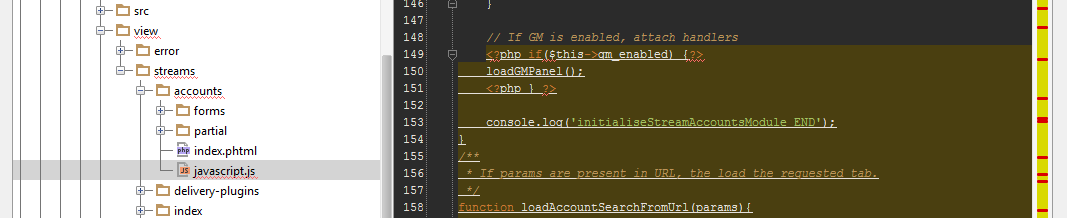
I'd expect PHPStorm to recognice this language injection, but it doesn't... It treats is as a literal string, which is OK for variables, but when I start putting conditional PHP statements in, the highlighting all goes to pan (see screenshot)
I took a look in Language Injections, but I don't see an option to inject PHP into Javascript...
Advice appreciated! Many thanks.
Attachment(s):
Screen Shot 2014-09-22 at 11.28.00.png
Please sign in to leave a comment.
Hi there,
Yes, it's possible, but it requires some additional moves.
In general:
The easiest way for #1 is to give such file:
Surely, you can just associate just this file with PHP (via the same "Settings | File Types"), but this will treat ALL files with such names in ALL projects as PHP -- don't think this is what you want.
For #2 -- "Settings | Template Data Languages" -- find your file there as assign "JavaScript" in right column.
P.S.
http://confluence.jetbrains.com/display/PhpStorm/Syntax+highlighting+of+PHP+inside+JavaScript+%28and+other+languages%29
Hi Andriy,
Actaully that makes a lot of sense - my actual view file is 'javascript.phtml' which I've renamed to .js for example's sake. So I think your solution will work jsut fine for me.
Many thanks!