Install IDEA 5.0 (Win32) from jetbrains.com

Hi!
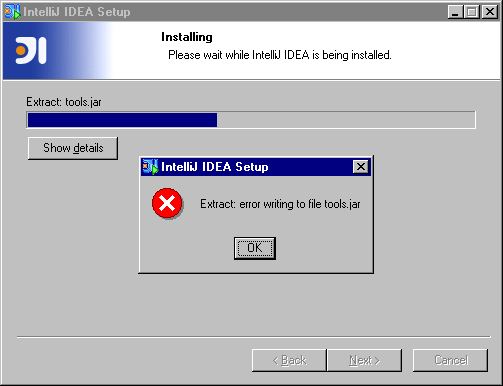
When I install IDEA 5.0, an error occur:
"Extract: error writing to file tools.jar"
Is this my fault (download error or something) or your fault?
greets
Andreas
Attachment(s):
screenshot.gif
Please sign in to leave a comment.
Hello Andreas,
Check that you are installing into an empry directory.
MD5 sum of the installer is 492186439d073fb0e200c1bb37abfcfd.
--
Serge Baranov
JetBrains, Inc
http://www.jetbrains.com
"Develop with pleasure!"
I checked the file! My installrt is also MD5: 492186439d073fb0e200c1bb37abfcfd
I installed IDEA into 'E:\IntelliJ IDEA 5.0'
It's a Microsoft Windows NT OS.
But the same error...
Any suggestions?
greets
Andreas
Hello Andreas,
If you have something that monitors files on your drive, try disabling it
(it may be antiviral monitor or local search engine, such as Google Desktop).
Try installing into different directory.
--
Serge Baranov
JetBrains, Inc
http://www.jetbrains.com
"Develop with pleasure!"
My antivir-monitor can't be disabled.
But in a week we change to XP.
Maybee that solves the problem.
Hello Andreas,
As a workaround you can download zipped IDEA version:
http://download.jetbrains.com/idea/idea-5.0.zip
Unpack and run IDEA_HOME\bin\idea.bat
--
Serge Baranov
JetBrains, Inc
http://www.jetbrains.com
"Develop with pleasure!"