Please check idea.log for possible hints (e.g. error messages/exceptions etc) -- on Windows 7 such file is located in C:\Users\USERNAME\.WebIde50\system\log , for other OS check http://devnet.jetbrains.net/docs/DOC-181
So ... the folder C:\Users\USERNAME\.WebIde50\system\ is completely empty? If so:
Please check access permissions for this folder
Try deleting whole C:\Users\USERNAME\.WebIde50 folder and launch PhpStorm again -- it should recreate all folders (back it up first, if desired, especially config one if you have already configured your IDE)
Maybe it is interference from antivirus or backup program (there were messages that Acronis Non-Stop backup can cause some issues -- unfortunately do not remember the details)
And I'm sorry I made a mistake and sent in response abuse. Tell me who to write about my mistake?
I have no clue what you are talking about. Maybe use Russian to explain (based on screenshot your Total Commander uses Russian interface)
1) Access available. 2) Delete the folder.WebIde50 run JetBrains PhpStorm 5.0.4 folder C:\Users\Inviseble_Demon\.WebIde50\system\empty 3) Switch off the antivirus. Nothing has changed. 4) Run from the administrator. Nothing has changed 5) System Restore was not done.


Hi there,
Please check idea.log for possible hints (e.g. error messages/exceptions etc) -- on Windows 7 such file is located in C:\Users\USERNAME\.WebIde50\system\log , for other OS check http://devnet.jetbrains.net/docs/DOC-181
OS Win7
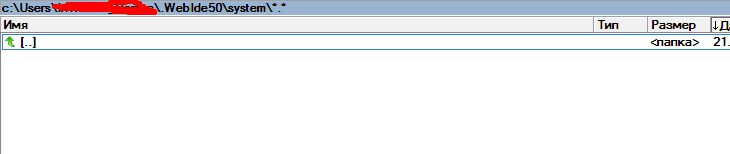
This file is not created
And I'm sorry I made a mistake and sent in response abuse.
Tell me who to write about my mistake?
So ... the folder C:\Users\USERNAME\.WebIde50\system\ is completely empty? If so:
I have no clue what you are talking about. Maybe use Russian to explain (based on screenshot your Total Commander uses Russian interface)
1) Access available.
2) Delete the folder.WebIde50 run JetBrains PhpStorm 5.0.4 folder C:\Users\Inviseble_Demon\.WebIde50\system\empty
3) Switch off the antivirus. Nothing has changed.
4) Run from the administrator. Nothing has changed
5) System Restore was not done.
The only other thing that I can suggest is to do a global search for idea.log file - maybe it is configured to use another storage location.
Other than that -- no ideas. Maybe worth submitting new ticket to the Issue Tracker
complete reinstallation did not help.
Thank you, maybe just change OS .....