ignored files are appearing in my commit options. is this right?

os: kubuntu 10.04
PhpStorm 2.0Beta
build: PS-103.8
in my settings
FILE -> SETTINGS -> PROJECT SETTINGS -> VERSION CONTROL -> IGNORED FILES
I have added the directories .idea/ and compile/ to the ignore section. Im understanding that this will mean that the version control system (git) should not include these files.
But when i right click on the main project folder and choose GIT -> COMMIT DIRECTORY I get this: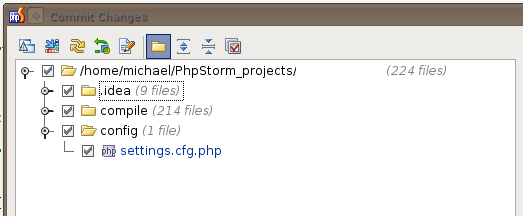
the /.idea/ and the /compile/ directory are both there with check marks waiting to be committed. Is this correct? and if so what is the point of adding stuff to the SETTINGS -> VERSION CONTROL -> IGNORE area.
Thanks
Please sign in to leave a comment.
Michael,
It is a known bug. http://youtrack.jetbrains.net/issue/IDEA-60354
Please use .gitignore when working with Git.
Even adding them to .gitignore does not stop them from showing up in the commit dialog.

Should i be un-checking them from here, or just straight commit and let git sort it out?
Do the changes show in the Changes View?
Also note, that if you have committed a file once, and only then added it to .gitignore, it won't be ignored. You have to remove it explicitly. See http://gitready.com/beginner/2009/03/06/ignoring-doesnt-remove-a-file.html
They did show, but after removing them from git, they no longer showed.
Thanks very much.