How to use a launcher in Ubuntu 10.04 x64

Just bought PhpStorm last night and have been loving it. I'm trying to use it at work on Ubuntu 10.04 x64, however, and can't get a launcher from the desktop to work. The IDE launches just fine if I go to PhpStorm's directory and launch the webide.sh script manually in a terminal. It has only failed when trying to go from a launcher or a symlink, though.
Details:
Installed in /users/<username>/programs/PhpStorm
Works:
$ cd /users/<username>/programs/PhpStorm/bin
$ ./webide.sh
Doesn't work:
Tried creating a launcher with the following in the execution field:
/users/<username>/programs/PhpStorm/bin/webide.sh
When I double-click it, it just sits there-- doesn't launch, no error message, nothing.
So I created a shell script called "phpStorm.sh" which has
#!/bin/bash
cd /users/<username>/programs/PhpStorm/bin
./webide.sh
After making the script executable and putting it into the launcher's execution field, I get the same response: nothing. No errors, no launching.
If I open a terminal and do
$ ./phpStorm.sh
Then it runs just fine.
Any ideas on how I could get this to launch from a desktop launcher?
Please sign in to leave a comment.
I was able to add it w/o any problems, and it just worked
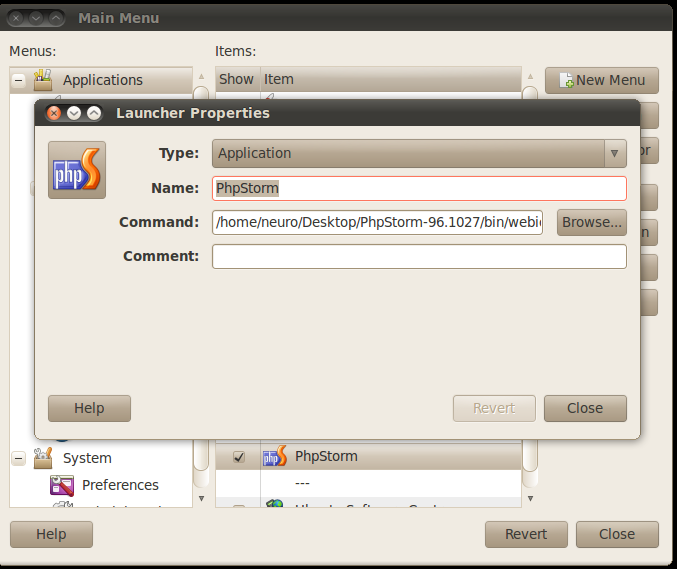
It's wondered me, why in arhive with EAP has no words about launch. No README even.
Make file "bin/webide.sh" executable (press right mouse button, "properties")
Follow instructions there:
http://www.cyberciti.biz/faq/howto-ubuntu-linux-install-configure-jdk-jre/
Open a shell prompt (terminal) and type the following to install JDK and JRE:
sudo apt-get install sun-java6-bin sun-java6-jre sun-java6-jdk
sudo update-java-alternatives -s java-6-sun
You also need to edit a file called /etc/jvm. This file defines the default system JVM search order. Each JVM should list their JAVA_HOME compatible directory in this file. The default system JVM is the first one available from top to bottom. Open /etc/jvm
sudo vi /etc/jvm
Make sure /usr/lib/jvm/java-6-sun is added to the top of JVM list
/usr/lib/jvm/java-6-sun
At the end your file should read as follows:
/usr/lib/jvm/java-6-sun
/usr/lib/jvm/java-gcj
/usr/lib/jvm/ia32-java-1.5.0-sun
/usr/lib/jvm/java-1.5.0-sun
/usr
Now launch "bin/webide.sh" to execute.
Im on the same system: (but using kde, not gnome desktop.)
os: kubuntu 10.04 x64
I've created a desktop launcher that works. (made by right clicking the K menu and editing the menu.)
[Desktop Entry]
Comment[en_US]=
Comment=
Exec=/home/me/utils/PhpStorm/bin/webide.sh
GenericName[en_US]=
GenericName=
Icon=/home/me/utils/PhpStorm/bin/webide.png
MimeType=
Name=PhpStorm
NoDisplay=false
Path=
StartupNotify=true
Terminal=false
TerminalOptions=
Type=Application
X-DBUS-ServiceName=
X-DBUS-StartupType=
X-KDE-SubstituteUID=false
X-KDE-Username=
Works fine.