is the corresponding d.ts file included in tsconfig.json? Does compilation work outside of WebStorm when using same config? Also, please provide your tsconfig.json and output from typescript compiler console
and where is the Promise defined? Also, can you provide the compiler console content?
>HTML tags is greyed as below
they aren't greyed in your screenshot - look normal... Only the comment appear in grey - as it should. Can you explain what is wrong here in your opinion?
>the background of html content is grey, just like they are selected. Previous version is clear white.
nothing has changed, this is the default background color for HTML tags that is there for years. you can change it in Settings | Editor | Color & Fonts | Language Defaults | Markup | Tag
>Cannot figure out where promise, require, then defined
What file is open when you Ctrl+click on Promise?
>there is no error in console during compiling. Here is last few lines
these are lines from webpack build. And I'm asking for TypeScript compiler console contents (Typescript toolwindow, Console tab)
I found the problem. 2016.2 incorrectly processed include/exclude order in tsconfig.json.
As a result, an exclude annotation will ban following include annotation. Then typings path will not be processed through the environment. I removed the exclude lines then solved.

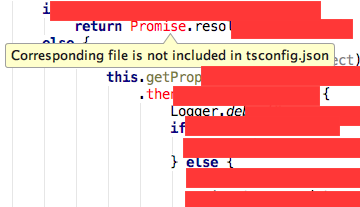
is the corresponding d.ts file included in tsconfig.json? Does compilation work outside of WebStorm when using same config? Also, please provide your tsconfig.json and output from typescript compiler console
Compilation works fine but just is marked red when writing code annoying.
and where is the Promise defined? Also, can you provide the compiler console content?
>HTML tags is greyed as below
they aren't greyed in your screenshot - look normal... Only the comment appear in grey - as it should. Can you explain what is wrong here in your opinion?
the background of html content is grey, just like they are selected. Previous version is clear white.
Cannot figure out where promise, require, then defined, maybe in typings.json but the point is in 2016.1.x no such problems.
there is no error in console during compiling. Here is last few lines.
7:486-493 This seems to be a pre-built javascript file. Though this is possible, it's not recommended. Try to require the original source to get better results.
@ ./~/swagger-client/browser/swagger-client.min.js 7:486-493
Child html-webpack-plugin for "index.html":
chunk {0} index.html 468 kB [rendered]
[0] ./~/html-webpack-plugin/lib/loader.js!./src/index.html 3.47 kB {0} [built]
factory:38ms building:38ms = 76ms
[1] ./~/html-webpack-plugin/~/lodash/index.js 411 kB {0} [built]
[0] 76ms -> factory:2786ms building:556ms = 3418ms
[2] ./~/underscore/underscore.js 52.9 kB {0} [built]
[0] 76ms -> [1] 3342ms -> factory:994ms building:1074ms = 5486ms
[3] (webpack)/buildin/module.js 251 bytes {0} [built]
[0] 76ms -> [1] 3342ms -> factory:3317ms building:973ms = 7708ms
webpack: bundle is now VALID.
>the background of html content is grey, just like they are selected. Previous version is clear white.
nothing has changed, this is the default background color for HTML tags that is there for years. you can change it in Settings | Editor | Color & Fonts | Language Defaults | Markup | Tag
>Cannot figure out where promise, require, then defined
What file is open when you Ctrl+click on Promise?
>there is no error in console during compiling. Here is last few lines
these are lines from webpack build. And I'm asking for TypeScript compiler console contents (Typescript toolwindow, Console tab)
only refer to admin/ where the project is located
then:
require:
No typescript toolwindow found in tool window selection tab
Hmm... Please attach a screenshot of Settings (Preferences) | Languages & Frameworks | TypeScript
I use webpack bundle to compile ts files. yeah I did not enable the compiler. since I think it will add unused files in my project
I found the problem. 2016.2 incorrectly processed include/exclude order in tsconfig.json.
As a result, an exclude annotation will ban following include annotation. Then typings path will not be processed through the environment. I removed the exclude lines then solved.
Thanks for clearing it up! Reproduced, please follow https://youtrack.jetbrains.com/issue/WEB-22377 for updates