Cannot resolve method which is generated by annotation processor

Dear community,
It looks like the old issue but I can not find any solution that make it works. Hope that I can get luck here.
I recently have developed an annotation processor to generate extra method to a class. It works perfectly, and class is generated as expected into `target/class/com/example/Entity`
# original class

@DynamicUpdate
public class Entity {

    private long id;
    private String name;
}

# After compilation, it locates in target/class/com/example with
package com.demo;

import com.example.DynamicUpdater;
import com.example.Generated;

public class Entity implements DynamicUpdater {
    private long id;
    private String name;

    public Entity() {
    }

    @Generated
    public Entity changeId(long id) {
        this.id = id;
        return this;
    }

    @Generated
    public Entity changeName(String name) {
        this.name = name;
        return this;
    }
}
In Main.class, I put
public class Main {

    public static void main(String[] args) {
        Entity entity = new Entity();
        entity.changeName("name");
        entity.changeId(0);
        entity.notifyChange("name", "John Doe");
        System.out.println(entity.getChanges());
    }
}
The strange is I able to run it successful by (right-click) > Run ‘Main.main()’ or using Ctrl + F5.
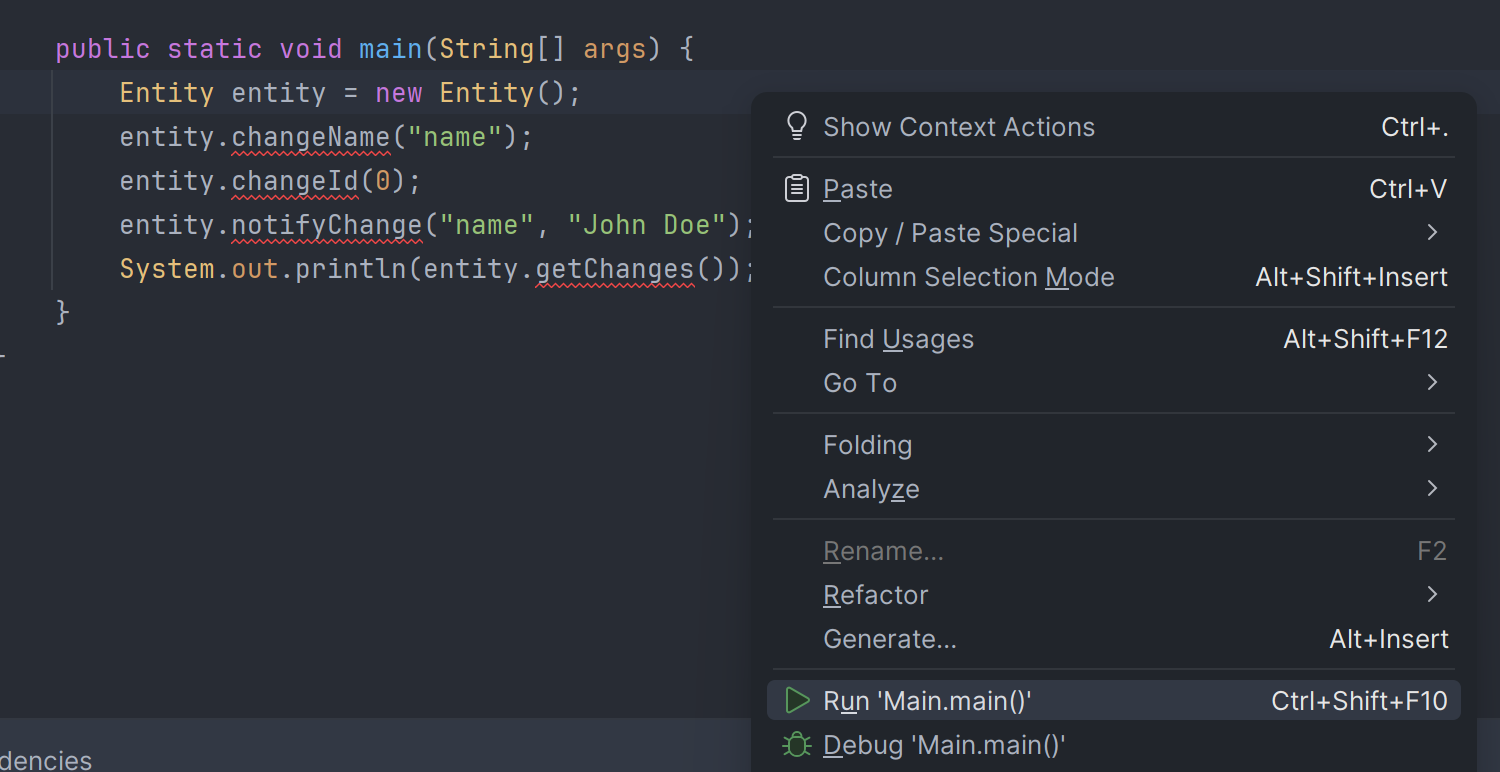

However, IntelliJ keeps marking error with text `Cannot resolve method`, and I


It also happen with setter/getter method ,which are generated by lombok, if I disable lombok plugin.

I have tried few solution including, but nothing works
- Configuring Annotation Processors
- Change ordering of Dependencies in Project Structure
- Mark target/classes as Source Root or Generated Source Root
Can some one please help?
Thank you,
P/S: I'm using IntelliJ 2024.3.5 (Community Edition)

Please sign in to leave a comment.
Hello,
Does it help to clear the application cache? File | Invalidate Caches → check first three boxes → Invalidate & Restart
If the issue remains, please provide a sample project so that I can test it on my side. It can be uploaded to our server (make sure to share the id of the upload here so that I can find it).
Hi Arina Efremova
I did tried Invalidate Caches few times, but it did not work.
My upload id is: 2025_04_04_wjUfWk2ecjPcHTSwbk1CpH (file: annotation.zip).
Thank you for the help,
Lộc Ngô Would you be able to share the affected Project for further investigation?
Roman Vatagin I uploaded my project to server, and upload id is: 2025_04_04_wjUfWk2ecjPcHTSwbk1CpH (file: annotation.zip).
Lộc Ngô Apologies for the delay in communication!
The issue stems from the nature of the Annotation Processors, as compiler extensions.
Their workflows and output (i.e. Methods they generate) are impossible to determine based off of static code analysis alone.
IDEA gets arounds this limitation with Plugins, like Lombok Plugin, which help IDEA match annotations and corresponding implementations. The Plugin is the reason why Lombok's getters and setters work as intended in the Project you've shared.
However, there's no such Plugin for the other AP your Project uses (
annotation-processorSubproject). So, in order for IDEA to correctly interpret this AP, you would have to create a Plugin for it.You can use Lombok Plugin's source code as reference, since your Plugin should following the same / similar logic.
Roman Vatagin Thank you for the response.
Creating and Installing another plugin will make IDE more heavy load and will properly impact performance, so I would like to avoid that solution.
I'm wondering whether it is limitation of IDE, or it is the problem of Annotation Processors itself? If it is problem of Annotation Processors, how can Eclipse and Netbeans deal with that. For Eclipse, it is able to recognize these methods after compiling code; while Netbeans seems to recognize them immediately (maybe auto build/compile on save is enabled)
Lộc Ngô I can't say I'm familiar with the mechanics that other IDEs employ, but resolving those on the fly is no trivial task.
Do they resolve them as belonging to a specific Class and allow for navigation or they just don't highlight them as unrecognized?
Roman Vatagin Yes, they can resolve and allow for navigation. Every time I add another property, it can recognize it immediately.
Lộc Ngô That would indicate that those IDEs rely on analyzing the compiled
.classfiles.While this is, technically, a valid solution for this problem, this approach tends to be less precise in terms of navigation and also scales poorly, making it unfit for larger, more complex Projects.
This is why IDEA relies on the Plugins instead.
Roman Vatagin I would like to say, it can get same accuracy as IntelliJ in terms of navigation. However, you are true that it will be scales poorly, and unfit for large and complex Projects.
The disadvantage of Plugins is it makes IDE bigger day by day since more and more plugins will be installed. And resource consumption are almost equivalent on all Projects (even many of them are small and simple Projects).
Anw, it looks like except for building a new Plugin, there is not any solution for my case.
Thank you,
Lộc Ngô Fair point!
I'll take this to the Product Management Team, so they can consider an option in IDEA that uses on the compiled code analysis instead of Plugins.