How do I use Markdown CSS to change colors *used inside code fences*?

IDEA gives you an ability to change how Markdown looks here:
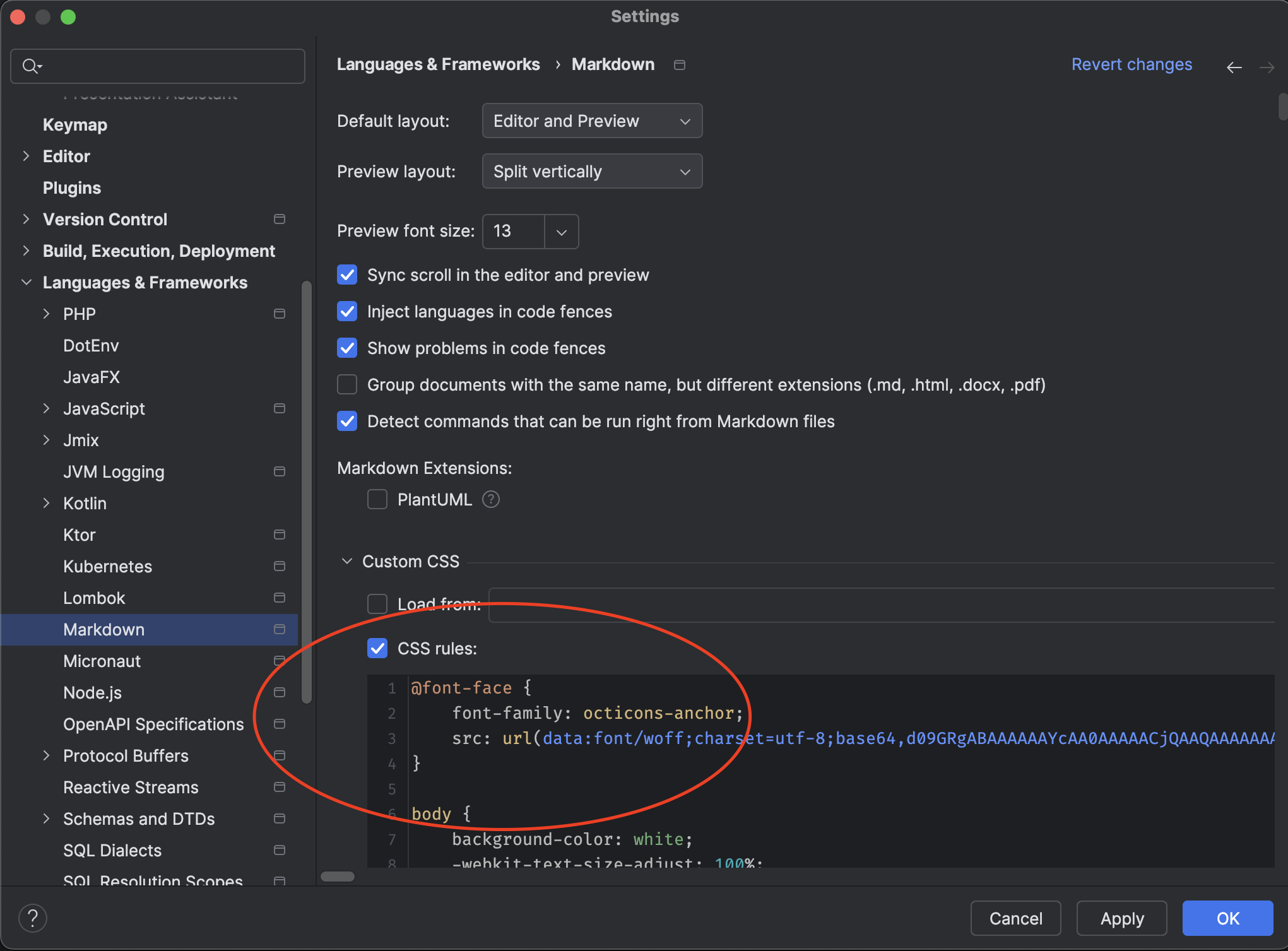
…and I've added rules that I'd found on Github for making IDEA Markdown previews follow (more or less) Github styling. But the changes are only partial.

The colors inside Markdown code fences are still coming from the current IDE color theme. I don't need to utterly and completely imitate Github here, but without modifying these colors they are poor colors for the light Github background if you're using, like I do, a dark theme. As you can see parenthesis and other delimiters/operators are very faint.
I've tried changing CSS classes like .markdown-body, .pl-k, .markdown-body .pl-k, .markdown-body pre .pl-k, etc., and I just can't seem to get at these colors inside code fences in order to change them.
I don't know if this is because I don't know correct CSS magic I need, or if these colors are simple unchangeable outside of complete theme changes.
Does anyone know how to do this? Is there any documentation on how this stuff is supposed to work?
While my Google searches have uncovered several examples of Markdown preview CSS meant to be used with IDEA, I have no idea how the people who created such CSS found out that CSS classes like .markdown-body even existed in the first place for them to know that that's what they needed to override.
I certainly don't want to change over to using a light color theme for everything else I do with IDEA just to make Github-like Markdown previews look better.
Please sign in to leave a comment.
I found out how to export an HTML version of my Markdown previews. If the exported HTML accurately conveys what's going on with the live preview, hopes seem very dim for changing how keywords and other elements inside code fences are rendered. Each such token is rendered as a span like this:
…with an explicit color provided by the style attribute, and with no class that defines the color used for the specific variety of token.
The best I can do having seen what's going on is this:
…which destroys all syntax color coding, but at least ensures that all text is dark and legible.
Can you please send the .md source file to https://uploads.jetbrains.com/, so we can reproduce the issue?
I don't think there's any need for that. It wouldn't matter what .md file I sent you anyway since what I discovered was a basic built-in limitation of how the Markdown preview is generated. I'm deep into the code for that right now, including having gone as far as modifying the Markdown preview to have the features that I want.
I'm not sure JetBrains will be interesting in a code contribution for this, but once I've done a bit more work on this feature I will submit a PR for it.
There is something I'd like to know, if you can provide me an answer here:
With the Community Edition source code I've been able to build and test just fine, but now I'd like to build a stand-alone macOS copy of the IDEA application. Short of that, I'd settle for how to build the plugin .jar files markdown.jar and intellij.markdown.compose.preview.jar.
One limitation of working with the Community Edition source code is that the CE has very limited syntax coloring and language support. So I'd like to build my new Markdown-related .jar files and transplant them into my copy of the Ultimate Edition to see how well they perform there.
Markdown plugin sources are in the public repo: https://github.com/JetBrains/intellij-community/tree/master/plugins/markdown
Yes, you can build your IDE files in Community Edition and replace files in the Ultimate installation with the copy. Just make sure the version tag is the same.