Why does running Roslyn Analyzer crashes with NuGet library?
Answered

When I create a new blank Roslyn project in Rider.
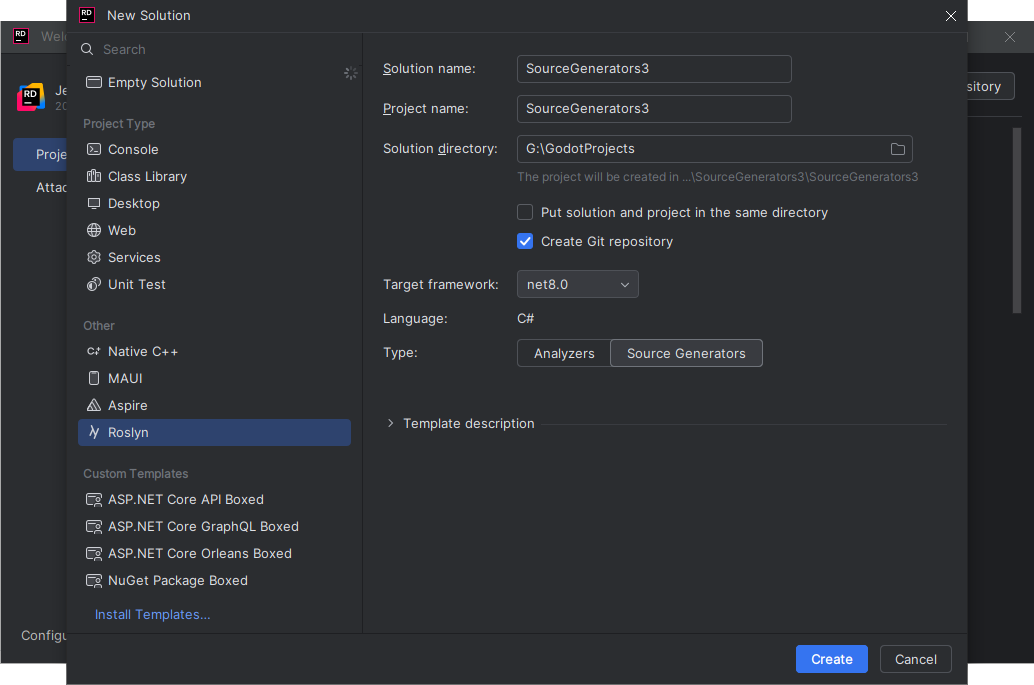
And then add any NuGet package to it.

(I've just inserted Newtonsoft.Json.WriteState writeState = WriteState.Array; into the source so that Newtonsoft is loaded )
using System.Collections.Immutable;
using System.IO;
using Microsoft.CodeAnalysis;
using Newtonsoft.Json;

namespace SourceGenerators3;

/// <summary>
/// A sample source generator that creates C# classes based on the text file (in this case, Domain Driven Design ubiquitous language registry).
/// When using a simple text file as a baseline, we can create a non-incremental source generator.
/// </summary>
[Generator]
public class SourceGeneratorWithAdditionalFiles : IIncrementalGenerator
{
    public void Initialize(IncrementalGeneratorInitializationContext context)
    {

        Newtonsoft.Json.WriteState writeState = WriteState.Array;

        var provider = context.AdditionalTextsProvider
            .Where(f => Path.GetFileName(f.Path) == "DDD.UbiquitousLanguageRegistry.txt")
            .Collect();

        context.RegisterSourceOutput(provider, GenerateCode);
    }

    private void GenerateCode(SourceProductionContext context, ImmutableArray<AdditionalText> files)
    {
        foreach (var file in files)
        {
            // Get the text of the file.
            var lines = file.GetText(context.CancellationToken)?.ToString().Split('\n');
            if (lines == null)
                continue;

            foreach (var line in lines)
            {
                var className = line.Trim();

                // Build up the source code.
                string source = $@"// <auto-generated/>

namespace Entities
{{
    public partial class {className}
    {{
    }}
}}
";
                // Add the source code to the compilation.
                context.AddSource($"{className}.g.cs", source);
            }
        }
    }
}
When I try to run the project

I get a FileNotFoundException in the project
warning CS8784: Generator 'SourceGeneratorWithAdditionalFiles' failed to initialize. It will not contribute to the output and compilation errors may occur as a result. Exception was of type 'FileNotFoundException' with message 'Could not load file or assembly 'Newtonsoft.Json, Version=13.0.0.0, Culture=neutral, PublicKeyToken=30ad4fe6b2a6aeed'. The system cannot find the file specified.'.
System.IO.FileNotFoundException: Could not load file or assembly 'Newtonsoft.Json, Version=13.0.0.0, Culture=neutral, PublicKeyToken=30ad4fe6b2a6aeed'. The system cannot find the file specified.
File name: 'Newtonsoft.Json, Version=13.0.0.0, Culture=neutral, PublicKeyToken=30ad4fe6b2a6aeed'
  at SourceGenerators3.SourceGeneratorWithAdditionalFiles.Initialize(IncrementalGeneratorInitializationContext context)
  at Microsoft.CodeAnalysis.GeneratorDriver.RunGeneratorsCore(Compilation compilation, DiagnosticBag diagnosticsBag, CancellationToken cancellationToken)
Can Anyone explain to me why this is happening?
Please sign in to leave a comment.
Hello Tom,
This issue occurs due to the nature of Source Generators. When Source Generator runs, it runs as part of the compilation process of the target project (the project that uses your generator). The Source Generator needs to have all its dependencies available at compile time in a special way, different from regular project dependencies.
This is a known behavior and there is a known solution to it. You might find these links helpful: 1, 2;
In short, there is a solution: Adjust the YourSourceGenerator.csproj in the following way:
The reason for this complexity is that Source Generators:
This is different from regular project dependencies because Source Generators execute during compilation, not at runtime. The
PrivateAssets="all"ensures that the dependency isn't transmitted to consuming projects, while the embedding process ensures the dependency is available when the generator runs.Hope that helps!