Cannot run script with run configurations

I have an application served by puma. Then I have some test script that makes calls to the server and verifies the results.
I run the test script with the ruby interpreter from the command line. It works. It uses test/unit gem to implement the tests.
I then tried to create a run configuration of the type ‘Ruby’,, that runs that script. When I execute the configuration I get the following output :
C:/devtools/Ruby34-x64/bin/ruby.exe -x C:\devtools\Ruby34-x64\bin\bundle exec C:\devtools\Ruby34-x64\bin\ruby.exe C:\Users\dlsa\.local\share\gem\ruby\3.4.0\gems\ruby-debug-ide-3.0.3\bin\rdebug-ide --key-value --step-over-in-blocks --disable-int-handler --evaluation-timeout 10 --evaluation-control --time-limit 100 --memory-limit 0 --full-value-time-limit 20000 --full-value-memory-limit 0 --rubymine-protocol-extensions --port 50263 --host 127.0.0.1 --dispatcher-port 50264 -- C:/code/shampoosbugtrack/tests/test_project.rb
Fast Debugger (ruby-debug-ide 3.0.3, debase 3.0.3, file filtering is supported, block breakpoints supported, smart steps supported, obtaining return values supported, partial obtaining of instance variables supported) listens on 127.0.0.1:50263
C:/Users/dlsa/.local/share/gem/ruby/3.4.0/gems/mysql2-0.5.6/lib/mysql2.rb:23: warning: fiddle was loaded from the standard library, but will no longer be part of the default gems starting from Ruby 3.5.0.
You can add fiddle to your Gemfile or gemspec to silence this warning.
Uncaught exception: cannot load such file -- test/unit
C:/devtools/Ruby34-x64/lib/ruby/3.4.0/bundled_gems.rb:82:in 'Kernel.require'
C:/devtools/Ruby34-x64/lib/ruby/3.4.0/bundled_gems.rb:82:in 'block (2 levels) in Kernel#replace_require'
C:/code/shampoosbugtrack/tests/test_project.rb:8:in '<top (required)>'
C:/Users/dlsa/.local/share/gem/ruby/3.4.0/gems/debase-3.0.3/lib/debase.rb:250:in 'Debase.load_protect'
C:/Users/dlsa/.local/share/gem/ruby/3.4.0/gems/debase-3.0.3/lib/debase.rb:250:in 'Debase.debug_load'
C:/devtools/Ruby34-x64/lib/ruby/3.4.0/bundled_gems.rb:82:in 'Kernel.require': cannot load such file -- test/unit (LoadError)
from C:/devtools/Ruby34-x64/lib/ruby/3.4.0/bundled_gems.rb:82:in 'block (2 levels) in Kernel#replace_require'
from C:/code/shampoosbugtrack/tests/test_project.rb:8:in '<top (required)>'
from C:/Users/dlsa/.local/share/gem/ruby/3.4.0/gems/debase-3.0.3/lib/debase.rb:250:in 'Debase.load_protect'
from C:/Users/dlsa/.local/share/gem/ruby/3.4.0/gems/debase-3.0.3/lib/debase.rb:250:in 'Debase.debug_load'
from C:/Users/dlsa/.local/share/gem/ruby/3.4.0/gems/ruby-debug-ide-3.0.3/lib/ruby-debug-ide.rb:129:in 'Debase.debug_program'
from C:/Users/dlsa/.local/share/gem/ruby/3.4.0/gems/ruby-debug-ide-3.0.3/bin/rdebug-ide:202:in '<main>'
Process finished with exit code 1
Could not find the cause. It worked without me installing anything, but then I installed the gem ‘test-unit’. same result.
I then turned to creating a remote debug configuration. There is a guide for that that I followed. I got up to the point where I have Open SSH running, the connection test is successful, and when I set the remote interpreter (which is on the same host), I click ‘OK’ but nothing happens. I have to click ‘Cancel’. Screenshot below :
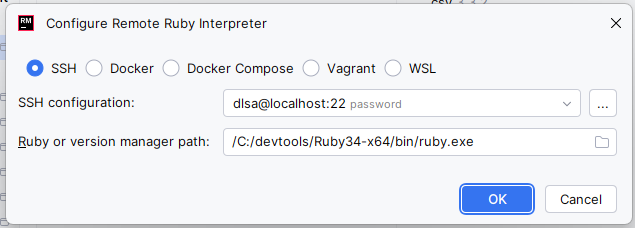
I then even tried a run configuration of the type ‘Ruby Console’, with the console type IRB. I got the same error than the one in the stack trace above.
Any help appreciated
Please sign in to leave a comment.
Hello,
In case you have local environment, you don't need to set up the remote interpreter.
As for the error you're getting, could you please specify:
1. is
test-unitinstalled? Is it listed in the Gemfile and in the External libraries node?2. do you manage to run your tests in Run mode, without debug?
I did not have the test-unit gem in the gem file. When I put it there the gem appeared in the External Libraries node. Now the error is gone and the tests run.
The reason I had for not putting the test-unit gem in the gem file is that its not part of the final application. It is just needed for tests. I had previously installed it manually with the gem command.and when running from a command line that was sufficient.
When I deploy the app I will have to remove that include from the gem file so the unit testing framework does not get installed in the live system.
nice