Run view gets duplicated in flutter project

The run view will get duplicated every time I switch back to it, in other words:
- From the “run” view I switch for example to the App Inspection or the Git view.
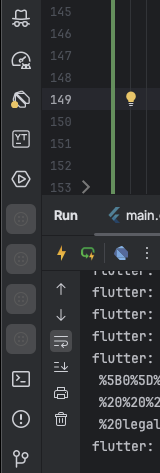
- I can't click the run view again because the icon is greyed out and the icon is not the play button one, but some strange circle with 4 dots in it.
- I go to “view” → “tool windows” → “run”, and in this menu the Run icon is a green square, instead of the standard play button.
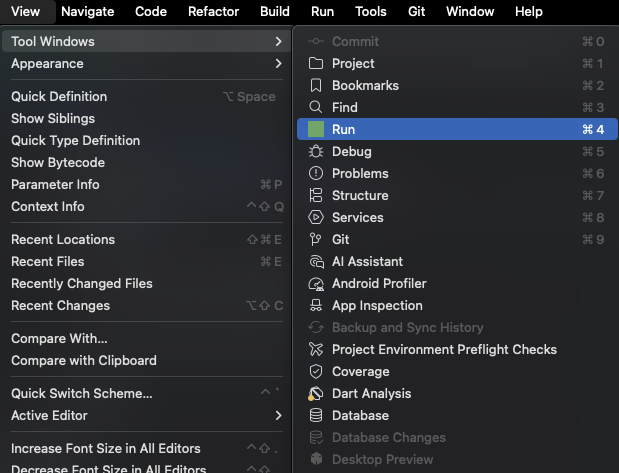
- When pressing the “run” view button, I get switched back to the run view.
- If I repeat steps 1 through 4, the run view with the strange circle icon will get duplicated
IDE Version:
IntelliJ IDEA 2025.2 (Ultimate Edition)
Build #IU-252.23892.409, built on July 31, 2025
Source revision: 0a9a69b3f9332
Licensed to Sergio Sánchez Basoco
Subscription is active until August 15, 2025.
Runtime version: 21.0.7+6-b1038.58 aarch64 (JCEF 122.1.9)
VM: OpenJDK 64-Bit Server VM by JetBrains s.r.o.
Toolkit: sun.lwawt.macosx.LWCToolkit
macOS 15.6
GC: G1 Young Generation, G1 Concurrent GC, G1 Old Generation
Memory: 8192M
Cores: 12
Metal Rendering is ON
Registry:
vcs.log.index.enable=true
ide.experimental.ui=true
terminal.new.ui.powershell.unix=true
eslint.additional.file.extensions=svelte
terminal.new.ui.fish=true
terminal.new.ui=true
Non-Bundled Plugins:
JavaScriptDebugger (252.23892.464)
org.jetbrains.completion.full.line (252.23892.458)
com.intellij.notebooks.core (252.23892.464)
com.jetbrains.darkPurpleTheme (1.3)
com.jetbrains.space (252.23892.201)
Subversion (252.23892.464)
com.intellij.copyright (252.23892.464)
org.editorconfig.editorconfigjetbrains (252.23892.464)
org.jetbrains.plugins.yaml (252.23892.464)
org.toml.lang (252.23892.464)
com.intellij.kubernetes (252.23892.464)
com.jetbrains.kmm (0.9-252.23892-IJ-466)
org.jetbrains.junie (252.264.89)
com.intellij.properties (252.23892.464)
com.intellij.velocity (252.23892.464)
com.intellij.spring (252.23892.458)
com.intellij.swagger (252.23892.464)
com.jetbrains.restClient (252.23892.464)
intellij.jupyter (252.23892.464)
Docker (252.23892.464)
com.intellij.ml.llm (252.23892.471)
com.intellij.nativeDebug (252.23892.346)
org.jetbrains.plugins.gitlab (252.23892.464-IU)
org.jetbrains.plugins.github (252.23892.464-IU)
org.jetbrains.android (252.23892.458)
com.android.tools.design (252.23892.458)
androidx.compose.plugins.idea (252.23892.360)
Dart (252.24322.5)
JavaScript (252.23892.458)
com.intellij.react (252.23892.458)
dev.blachut.svelte.lang (252.23892.298)
org.jetbrains.plugins.vue (252.23892.449)
com.github.jk1.ytplugin (2024.2.132)
Karma (252.25204.0)
io.flutter (87.0)
org.jetbrains.security.package-checker (252.23892.464)
com.intellij.microservices.ui (252.23892.464)
Kotlin: 252.23892.409-IJ
Please sign in to leave a comment.
That solved the issue, uninstalled and installed again the Dart and Flutter plugins.
Thank you