Terminal: How to revert "Remove from sidebar"?
Answered

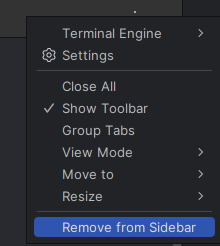
I hit this button by misake. How do I reverse this? When I open the terminal again with Alt-F12, the menu item continues to read “Remove from Sidebar”, even though it has already been removed. It seems to me that it should read “Add to Sidebar”. Anyhow, I want the button back in the sidebar, reversing this. How do I do that? It isn't obvious at all. Thanks.
Please sign in to leave a comment.
นวัตกรรมและแนวคิดที่ยอดเยี่ยมมาก
Hello, martin_97. When you open the Terminal window again, it should be added to the sidebar automatically; that's why the action is not renamed to Add to Sidebar.
It was added to the bottom-right toolbar and I wasn't looking for it there. The icon originally was in the bottom-left toolbar. Perhaps icons should remember where they were when hidden to they can restored to where the user is expecting them to be.
Unfortunately, can't reproduce the problem on my side; the Terminal icon is added to the same place on the bottom left where it was before.
Please note that you can move the sidebar icon by right-clicking it and selecting the necessary position in the Move to submenu.