Add Maven Artifact Dependency
Answered

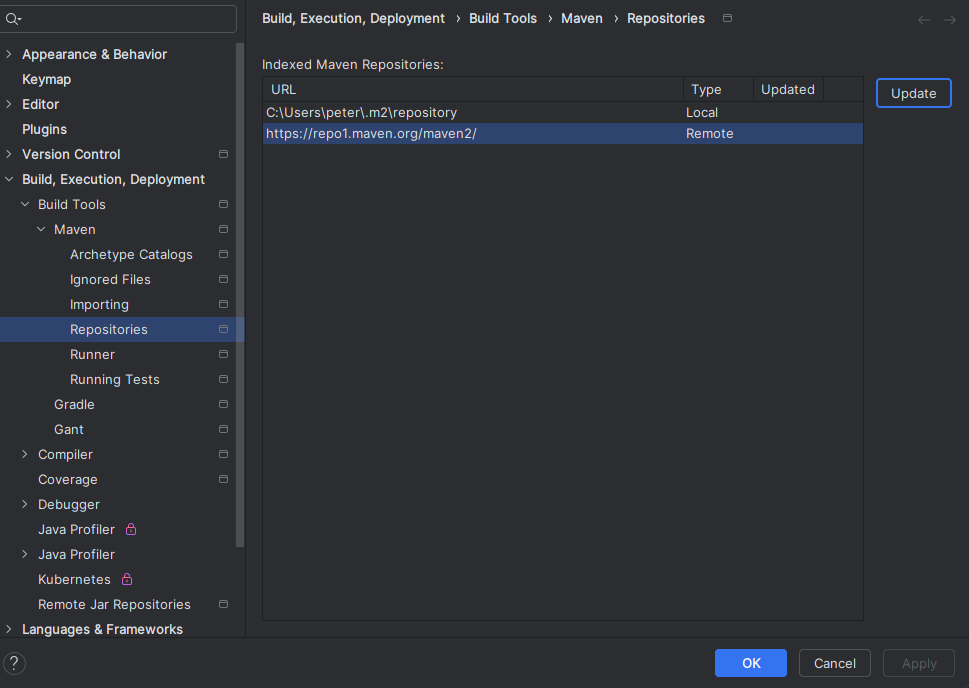
Hello I tried to add a “Maven Artifact Dependency” in gradle and noticed that nothing is being returned. I investigated further and tried to update the Repository cache for Maven. However hitting update does nothing, doesnt spawn a process…
I was wondering if anybody has also run into the same issue.
Please sign in to leave a comment.
Hello,
Can you check if you have this problem in version 2025.1.4.1 of the IDE too? Or just 2025.2?
Is the IDE installed via Toolbox or manually?
Please also provide IDE logs for analysis (entire archive): Help | Collect Logs and Diagnostic Data. I will search for exceptions and check your system environment settings.
Logs can be uploaded securely to our server at https://uploads.jetbrains.com. Make sure to share the id of the upload here so that I can find it.
Hello, I uploaded my logs to the following Upload id: 2025_09_02_Vt6qaABaw1zAWTQJrpFhoF (file: idea-logs-20250902-18071612188372870202820689.zip).
Deleting the gradle cache did not resolve my issue
Peterflis01 The idea.log file in the archive is empty. Could you look for older log files with names like idea1.log in the same folder and upload them too?
I have uploaded again, idea.log looks to be populated in this one.
Upload id: 2025_09_03_4XYJip5UUMaQ84rFQtMWJW (file: idea-logs-20250903-1646419969851168700040238.zip)
There is the following error in the logs which indicates corrupted Maven dependency cache:
Have you tried to also close the IDE and delete the entire
C:\Users\<YOUR_USERNAME>\.m2\repositoryfolder, then reopen the project and reload it from the Maven tool window?I did try this, which did work for local dependencies that I have installed. I was looking to be able to query maven central so i look up guava and it comes up with whats on maven central. idk if that is still supported