Help. Inspections are turned on in one project, off in another, and I cannot turn them on.
Answered

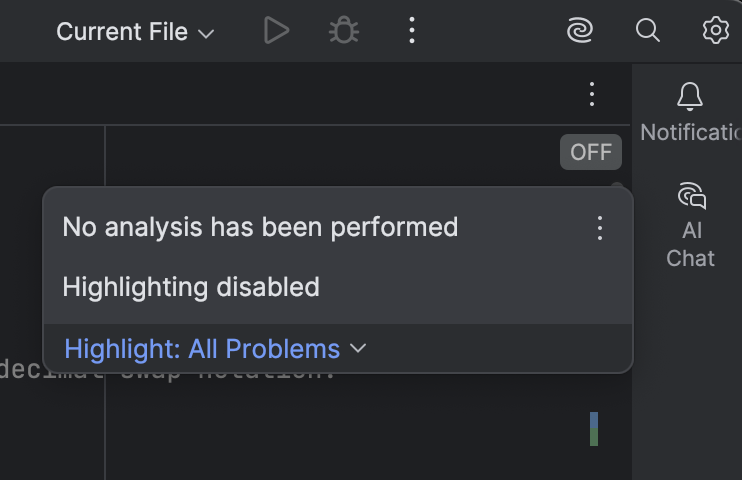
I have two closely related Java projects (one is a newer version of the other), both opened in IntelliJ IDEA in separate windows, so the same instance of IntelliJ IDEA. In the older project, inspections work as expected, but in the newer project inspections are turned off and I have been unable turn them on. And running Code / Inspect Code shows nothing about the Java code, just a handful of General, HTML, Markdown, etc. warnings. Pasted here is a screen grab of the inspection indicator that says “OFF” even though clicking it reveals that Highlight All Problems is on. This is on IntelliJ IDEA 2025.2.2 CE. How can I really turn inspections on for the new project? Thanks.
Please sign in to leave a comment.
Hello Jxt, thanks for reaching out!
Please try the following steps to resolve this issue:
src/main/javafolder (or the equivalent where your source code is located) is marked as 'Sources', not 'Excluded'.If you still have issues after performing all these steps, please provide us a full screenshot of your IDEA with this issue and logs via Help | Collect Logs and Diagnostic Data. Please use our server to upload and provide us with the Upload ID. The uploaded data will be accessible only to our team and will be used solely for investigating this issue)
Thank you very much. That solved my problem. The project settings were correct, but the module settings were not. In fact, there were NO modules at all. I could see all the code, but I had failed to add modules to the project. Adding them, and messing around with other settings got me going again. Thanks again.
Glad to hear it helped!
If you have any questions in the future, feel free to reach out to us!