Unshelve Changes dialog shows empty file list - unable to restore shelved changes
Answered

Problem:
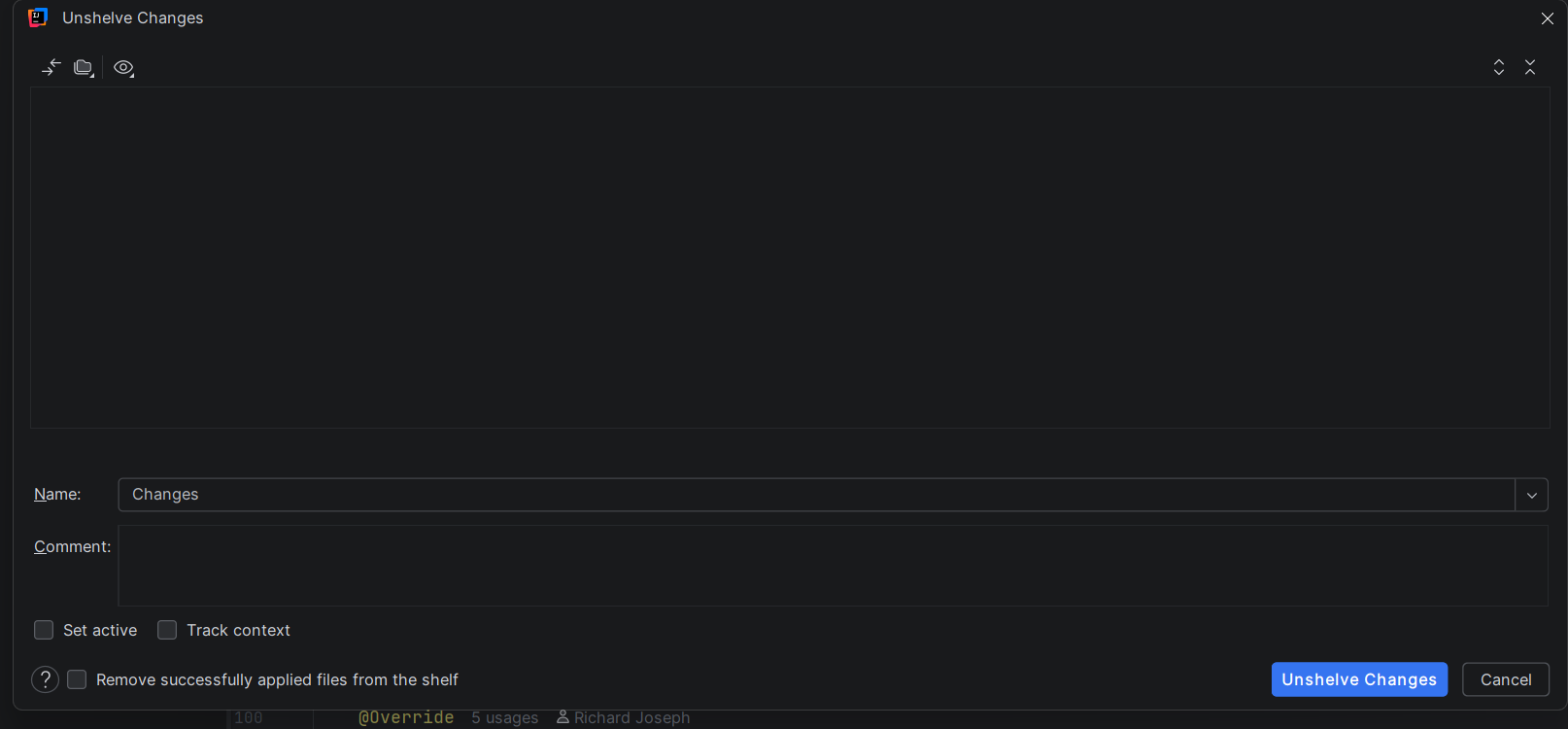
When I try to unshelve previously shelved changes, the "Unshelve Changes" dialog opens but the file list area is completely empty. I can see:
- The changelist name ("changes")
- The comment I added when shelving
- The "Unshelve Changes" and "Cancel" buttons
- ❌ No files in the list - just a blank/empty area where the file tree should be
This makes it impossible to see what files were shelved or to restore them.
Please Note: If I click on “Unshelve Changes” files are getting added to VCS
Environment:
- IntelliJ IDEA version: 2025.3.2
- OS: Windows
- VCS: Git
Steps I took:
- Made changes to several files
- Shelved them via
VCS→Shelve Changes - Added changelist name and comment
- Shelving appeared successful - changes were removed from working directory
- Attempted to unshelve via
VCS→Unshelve Changes - Dialog opens but shows no files
What I've already tried:
- Restarting IntelliJ IDEA - issue persists
- Checked
.idea/shelf/directory - patch files exist and are not empty - Tried right-clicking the shelf entry - same empty dialog
- ❌ Haven't tried invalidating caches yet
Questions:
- Has anyone else experienced this issue? Is this a known bug or specific to my setup?
Please sign in to leave a comment.
Tracked reports:
• https://youtrack.jetbrains.com/issue/IJPL-231556/Cant-see-any-files-in-Unshelve-Changes-window
• https://youtrack.jetbrains.com/issue/IJPL-231958/Unshelve-changes-Git-not-working-properly
Workarounds (factual, based on the reports):
• Click Unshelve Changes even if the list is blank (the operation can still complete).
• If the button looks disabled, hover over it first (some users report it becomes visually enabled), then click.
• If you need the file preview and can’t work around it, the practical mitigation is to use a different IDE build/version where the dialog UI isn’t affected until a fixed build is available.
Emin Karapetyan,
Do you have an estimated timeline for fixing this bug?
The affected reports are being tracked in YouTrack (for example, IJPL-231556 / IJPL-231958), but those tickets don’t currently list a “Planned for” version, so we can’t provide an ETA from public information. The best option for updates is to follow/watch the YouTrack issue(s), and you’ll be notified when a fix version/build is set or a fix is released.