Maven cannot find MyFaces + PrimeFaces + OmniFaces dependencies for Quarkus app (quarkiverse)

Hello all.
This is my first time creating a Quarkus app.
I was using the command line tool to generate a REST-based basic project (the one with the GreetingResource).
Here the dependencies from the Maven pom.xml:
<dependencies>
   <!-- Quarkus -->
   <dependency>
       <groupId>io.quarkus</groupId>
       <artifactId>quarkus-rest</artifactId>
   </dependency>
   <dependency>
       <groupId>io.quarkus</groupId>
       <artifactId>quarkus-rest-jackson</artifactId>
   </dependency>
   <dependency>
       <groupId>io.quarkus</groupId>
       <artifactId>quarkus-arc</artifactId>
   </dependency>
   <dependency>
       <groupId>io.quarkus</groupId>
       <artifactId>quarkus-agroal</artifactId>
   </dependency>
   <dependency>
       <groupId>io.quarkus</groupId>
       <artifactId>quarkus-hibernate-orm</artifactId>
   </dependency>
   <dependency>
       <groupId>io.quarkus</groupId>
       <artifactId>quarkus-hibernate-orm-panache</artifactId>
   </dependency>
   <dependency>
       <groupId>io.quarkus</groupId>
       <artifactId>quarkus-jdbc-postgresql</artifactId>
   </dependency>
   <!-- Test -->
   <dependency>
       <groupId>io.quarkus</groupId>
       <artifactId>quarkus-junit5</artifactId>
       <scope>test</scope>
   </dependency>
   <dependency>
       <groupId>io.rest-assured</groupId>
       <artifactId>rest-assured</artifactId>
       <scope>test</scope>
   </dependency>
</dependencies>
Now I am trying to install the Faces + PrimeFaces + OmniFaces extensions. The customer explicitly wants this for the prototype software...
So, this means adding the following dependencies to the pom.xml (I basically copied them from https://github.com/melloware/quarkus-faces/blob/main/pom.xml):
<!-- Faces -->
<dependency>
   <groupId>org.apache.myfaces.core.extensions.quarkus</groupId>
   <artifactId>myfaces-quarkus</artifactId>
   <version>4.1.2</version>
</dependency>
<dependency>
   <groupId>io.quarkiverse.primefaces</groupId>
   <artifactId>quarkus-primefaces</artifactId>
   <version>4.1.2</version>
</dependency>
<dependency>
   <groupId>io.quarkiverse.omnifaces</groupId>
   <artifactId>quarkus-omnifaces</artifactId>
   <version>4.1.2</version>
</dependency>
However, IntelliJ / Maven complains about not being able to find them:
Dependency 'org.apache.myfaces.core.extensions.quarkus' not found
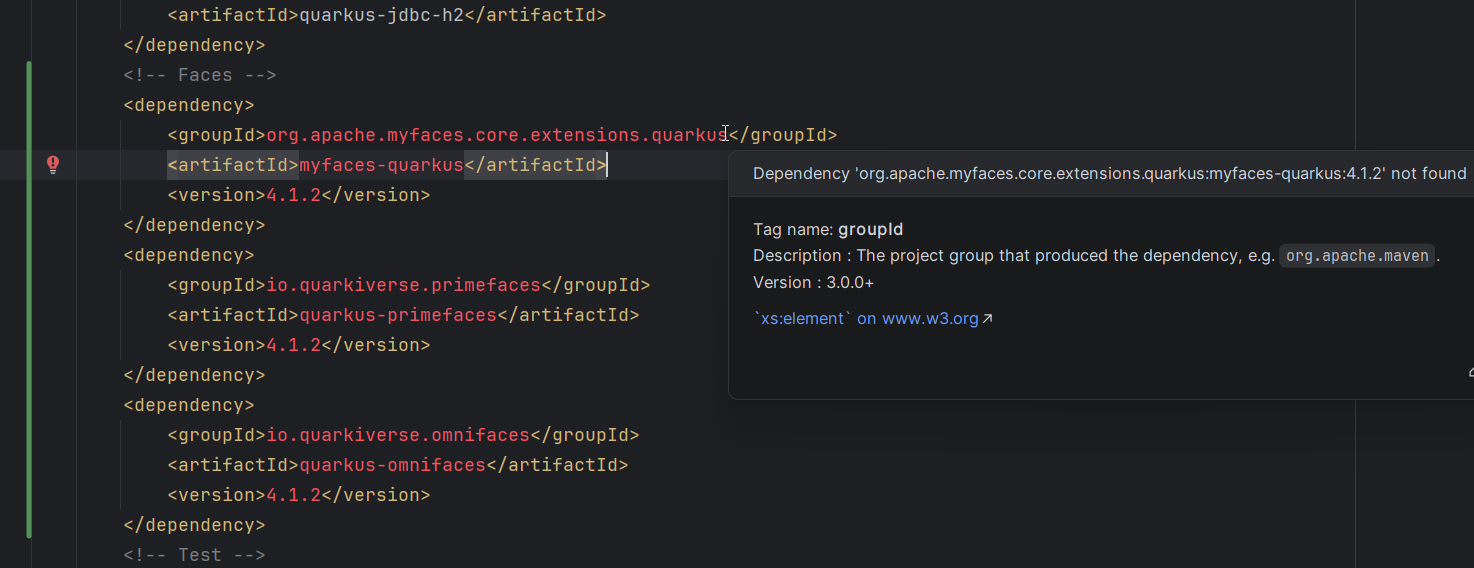
Here's my .m2 settings.xml:

<?xml version="1.0" encoding="UTF-8"?>
<settings xmlns="http://maven.apache.org/SETTINGS/1.0.0"
         xmlns:xsi="http://www.w3.org/2001/XMLSchema-instance"
         xsi:schemaLocation="http://maven.apache.org/SETTINGS/1.0.0 http://maven.apache.org/xsd/settings-1.0.0.xsd">

   <profiles>
       <profile>
           <id>jboss-public</id>
           <repositories>
               <repository>
                   <id>google-maven-central</id>
                   <name>GCS Maven Central mirror EU</name>
                   <url>https://maven-central.storage-download.googleapis.com/maven2/</url>
                   <releases>
                       <enabled>true</enabled>
                   </releases>
                   <snapshots>
                       <enabled>false</enabled>
                   </snapshots>
               </repository>
               <repository>
                   <id>jitpack.io</id>
                   <url>https://jitpack.io</url>
               </repository>
               <repository>
                   <id>jboss-public-repository</id>
                   <name>JBoss Public Maven Repository Group</name>
                   <url>https://repository.jboss.org/nexus/content/groups/public/</url>
               </repository>
           </repositories>
       </profile>
   </profiles>

   <activeProfiles>
       <activeProfile>jboss-public</activeProfile>
   </activeProfiles>

</settings>
I thought this would be a fairly easy task to add Faces + PF + OF to the project.
I looked at many examples (I do not remember all the links, but they were many):
https://www.melloware.com/quarkus-faces-using-jsf-with-quarkus/
https://quarkus.io/extensions/org.apache.myfaces.core.extensions.quarkus/myfaces-quarkus/
and more. But they all fail to download the respective artifacts.
What am I missing?
Please sign in to leave a comment.
Hi there,
It doesn't look like a Quarkus-Faces problem - the coordinates you are using are valid. The "Dependency ... not found" message almost always comes from Maven/repository configuration (and then IDEA just reflects that), not from the code itself.
To narrow it down:
1. Check if Maven itself can resolve the artifacts
From the project directory, run on the command line:
If these commands succeed, Maven can see the artifacts and the issue is just IDEA's indexing (see step 3).
If they fail with "Could not find artifact ... in repo ...", it is a pure Maven/repository issue (see step 2).
2. Verify your Maven repositories (settings.xml)
From your
~/.m2/settings.xmlyou are using agoogle-maven-centralmirror and some extra repos. It is possible that this mirror does not expose these particular artifacts.Try to:
settings.xmlso that Maven falls back to the default Maven Centraldependency:getcommands aboveIf it works without the mirror but not with it, add plain Maven Central explicitly, for example:
(or keep your existing profile and just add an additional
<repository>that points to Maven Central or whichever repository actually hosts these artifacts).You can also double-check which repositories Maven is really using with:
3. Make sure IntelliJ IDEA uses the same Maven and settings
In IDEA:
~/.m2/settings.xml, or explicitly set it to your settings file.If Maven CLI can resolve the artifacts, after the repository index update and reimport the red "Dependency '...' not found" highlight in
pom.xmlshould disappear.4. Align versions with the sample POM
In the sample
quarkus-facespom.xmlyou linked, versions are defined as properties (e.g.,${myfaces.version}). To avoid typos, it is safest to copy these properties and usages verbatim into your ownpom.xml(or at least make sure you are using versions that actually exist).If none of this helps, it would be great to have a test project to check. You can upload it to Github or to our server at https://uploads.jetbrains.com (share Upload ID here so that I can find it).