Font rendering in the terminal incorrect

I recently updated webstom to WebStorm 2017.3.3 and noticed the terminal no longer renders the fonts as it used to. Is this a bug or is there a setting I need to change to remove the extra padding around different symbols?
In the attached screenshot, the top is iterm2 and how webstorm used to display the command line. You can now see the extra padding around the chevrons which results in the line overflowing.
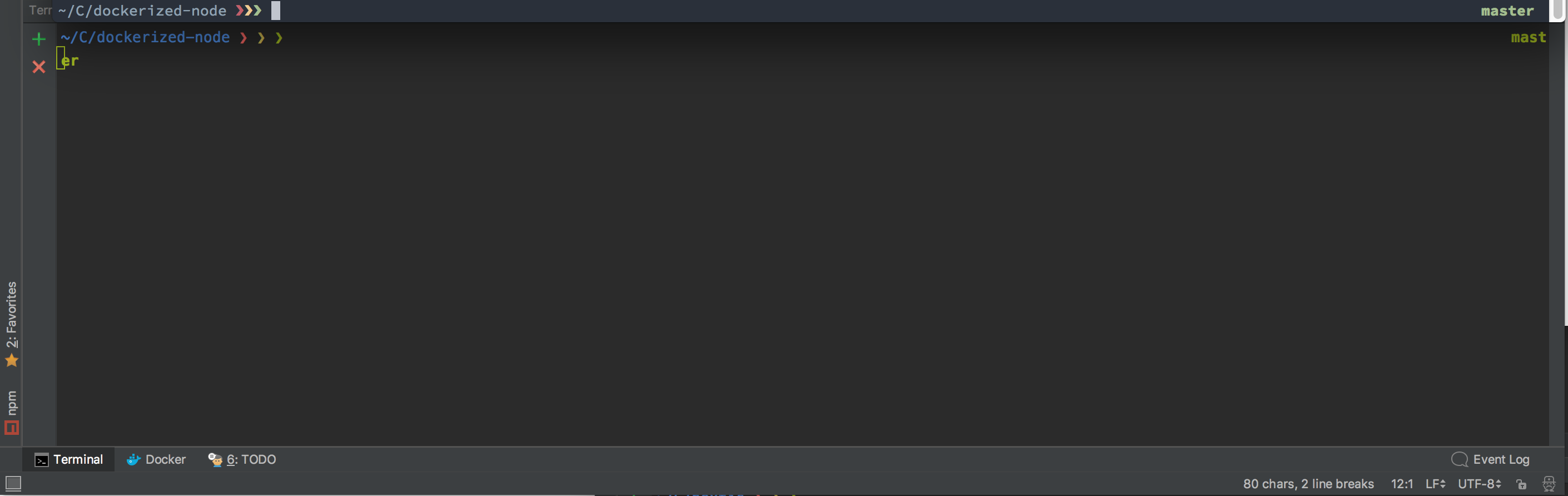
The following are my font settings:

This is the build information:
WebStorm 2017.3.3
Build #WS-173.4301.22, built on January 15, 2018
JRE: 1.8.0_152-release-1024-b11 x86_64
JVM: OpenJDK 64-Bit Server VM by JetBrains s.r.o
Mac OS X 10.13.2
Please sign in to leave a comment.
If I copy and paste the command line from the terminal into the font preview box the characters are given the proper spacing.
looks similar to https://youtrack.jetbrains.com/issue/IDEA-184513, please follow it for updates