Autocomplete options from current file missing from autocomplete popup
Answered

I have two .sql files using exactly the same dialect. But one shows names from the existing file in the autocomplete popup. And the other (newer) one doesn't. I restarted intellij and now neither file shows items in the popup. Note that pressing Alt+Slash does autocomplete successfully. It's just that they don't show up in the popup most of the times.
How can I get words from the current file/project to show up in the autocomplete popup?
Please sign in to leave a comment.
What names are not shown? Please provide the screenshots and the example files. What SQL dialect do you use? What SQL Resolution scopes do you have configured for the files?
I have no SQL Resolution scope defined. And I'm using generic sql dialect.
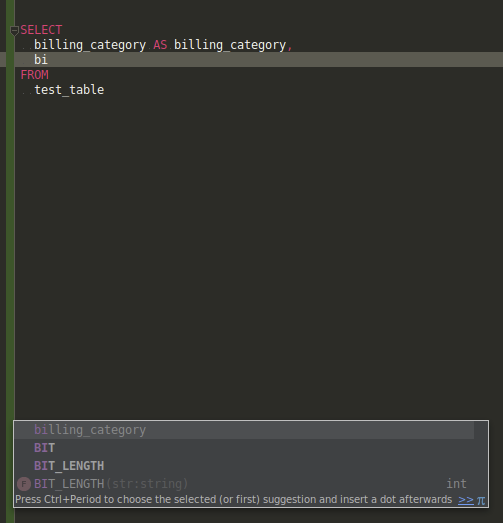
After a little more testing, it seems I get autocomplete for words in the popup if the word is in my SELECT statement followed by AS. So billing will show in the popup if I write the following query:
SELECT billing AS billing FROM table
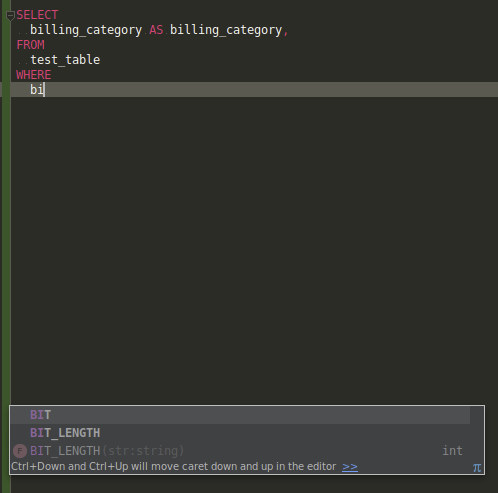
BUT billing will only appear in the popup in later SELECT statements. Meaning, it won't be presented if later I try to add "WHERE billing" to the query. I've attached screenshots of this occurring.
How do I just make autocomplete suggestions show in the popup for ALL words from the existing script? They've clearly been indexed because they appear when I press Alt+Slash to autocomplete.