IntelliJ IDEA Creating postfix expression doesn't work
Answered

I am trying to create new custom postfix expression, but it shows two Javas in the creation dropdown.
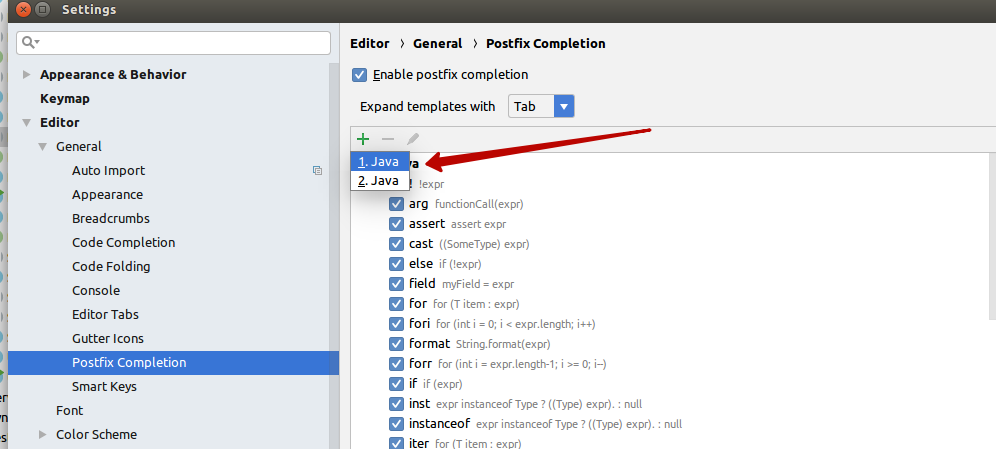
When I create expression under any Java, after saving and reopening postfix expressions settings created expression disappears.
On the clean IDE with default settings, it shows one Java, but I don't want to lose all my settings, so I don't want just to reset settings.
Can anyone help, why it's showing two Javas on the creation dropdown, or where IDE keeps/takes this options (maybe any plugin can affect it or other non-default settings)?
I tried to change Boot JDK and remove all available JDKs, but it didn't help.
Please sign in to leave a comment.
Hello Alexander,
Could you please share idea.log ("Help | Show log in...") after restarting IDEA?
I closed IDEA, cleared the log file and launched IDEA. Here is the log file: http://textuploader.com/dzlo4
Alexander,
Could you please temporary disable custom plugins:
Yeah, I disabled them and found that the issue is caused by the Lombok Plugin. Thanks!
Alexander,
You are welcome!
IntelliJ IDEA 2020.2.3, still not working with Lombok Plugin (0.23-2018.3), works fine without.
Try to update the Lombok plugin to (0.33-2020.2) version. (https://www.jetbrains.com/help/idea/managing-plugins.html)