Protractor Test Selenium Server Not Automatically Starting

Hi,
I'm currently evaluating WebStorm for use on a company project. I've been following the help guide to create a new project and execute a Protractor test, https://www.jetbrains.com/help/webstorm/protractor.html .
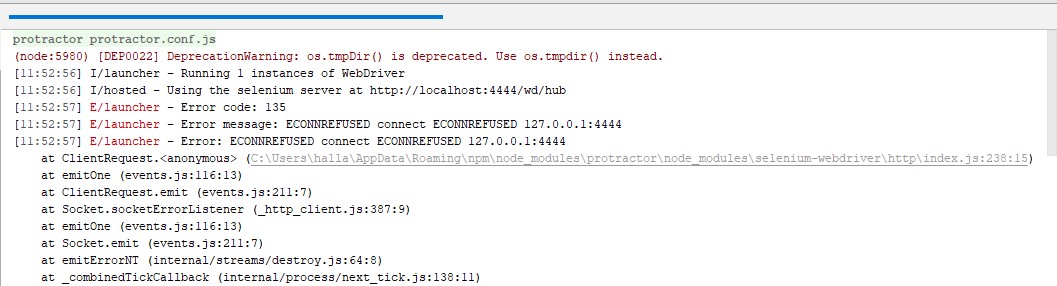
When I execute the Run Configuration I've created for the test I get an error message instead. If I manually start the webdriver-manager in a WebStrorm terminal window first the Protractor test will then execute as expected.
I thought I had configured things correctly as per the above help page link. Can you please help with what I have missed...
Detailed Information:
- I created a new, blank JS project and added the todo.spec.js and protractor.conf.js files to it
- I created a new Protractor run configuration
- Executing the Protractor run configuration generates the error message captured in the screenshot
- If I manually start the selenium server first and then execute the same protractor run configuration the test passes
- If I have understood the help page linked above correctly, and I haven't missed any steps out, I shouldn't need to start the selenium server manually before executing my test.
- What have I missed please?
- NB: I've attached a set of screenshots here and I've also submitted the example project; along with the IDE logfile; to support (as I couldn't see a way to attach it here)
Many thanks.
Kind regards
Adam



Please sign in to leave a comment.
You will get the same results when running your tests in terminal, your issue has absolutely nothing to do the WebStorm. If you don't like to start server manually, you need to set up your protractor configuration accordingly.
If you have a standalone server installed, you can start it automatically by specifying
seleniumServerJarin protractor.conf.js - see http://www.protractortest.org/#/server-setup#standalone-selenium-server, Starting the Server from a Test ScriptAnother option is using
directConnect- see http://www.protractortest.org/#/server-setup#connecting-directly-to-browser-driversHi there,
Many thanks for getting back to me so quickly. Could the confusion then be arising from JetBrains helpfile on the use of Protractor and Webstorm; https://www.jetbrains.com/help/webstorm/protractor.html. As per the following screenshot I have followed these instructions and I quote "The Selenium Server starts automatically without any steps from your side."
Kind regards
Adam
I'm not quite sure what is meant in these Help instructions:( Webstorm just starts the protractor with specified configuration file, you need to care yourrself about setting it up in the way you like...
We have a feature request for a possibility to start Selenium server automatically, please vote for https://youtrack.jetbrains.com/issue/WEB-23988 to be notified on any progress with it
Hi there,
Again my thanks for getting back to me. As a result could you please check with your colleagues what is meant by the official help page information. At this point it reads that the Selenium Server should be started automatically when we know it isn't right now. So this could mean we have either:
What read as a full integration of Protractor (and also Cucumber.js) testing with WebStorm was one of the key reasons it was short listed for evaluation for my company's project. Before making any recommendations it would be nice to be clear on what the situation is going forwards. It is worth noting that the information on the IntelliJ Ultimate help pages is exactly the same. Many thanks .
Kind regards
Adam
It's the issue with the official help page information - https://youtrack.jetbrains.com/issue/WEB-31456
Hi,
Thank for getting back to me. That is unfortunate then since the official help information shows it having different functionality to what is currently available. Have you been able to confirm this with your colleagues as I previously requested?
Kind regards
Adam Hall
yes