Random single files in webstorm are treated as excluded

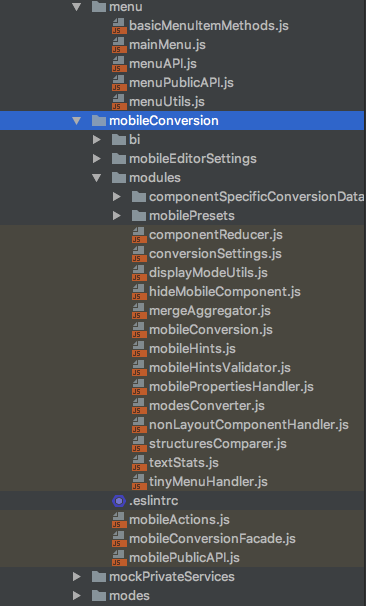
I have a folder with files that are treated by webstorm as excluded, they do not appear in search results and have the UI mark of an excluded file
However the folder itself is not excluded, and marking it as excluded and then cancelling exclusion does nothing for the files inside
Can anyone suggest a way to fix that ?
adding a screenshot of my project tree, note all the files under 'mobileConversion' treated as excluded
also my webstorm version is:
WebStorm 2017.1.3
Build #WS-171.4424.63, built on May 16, 2017
JRE: 1.8.0_112-release-736-b21 x86_64
JVM: OpenJDK 64-Bit Server VM by JetBrains s.r.o
Mac OS X 10.13
Please sign in to leave a comment.
Can you check if these files are added to any of javascript libraries in Settings | Languages & Frameworks | JavaScript | Libraries?
I don't see anything like that in javascript libraries
adding a screenshot
weird... are there any symlinks in the project path? Did you try invalidating caches (File | Invalidate caches, Invalidate and restart)? Also, can you check if the issue is related to the project settings? Backup and delete project
.ideafolderand try recreating the project from scratch by opening project root folder with File | Open - does the issue persist?It worked !
I quit Webstorm, deleted the project .idea folder and reopened the project from file -> open
Thanks a lot :)
Great, thanks for update:)