Running application from webstorm does not work

Hi, this is my first post on this forum. I have a problem running application with webstorm.
From github have fetched the project and then have executed index.html..
The first problem if I hit run I get this kind of warning in the window:

Second problem.. If I run index.html then the web page is not displayed correctly and get a lot of errors in console:

then the blank page is displayed:
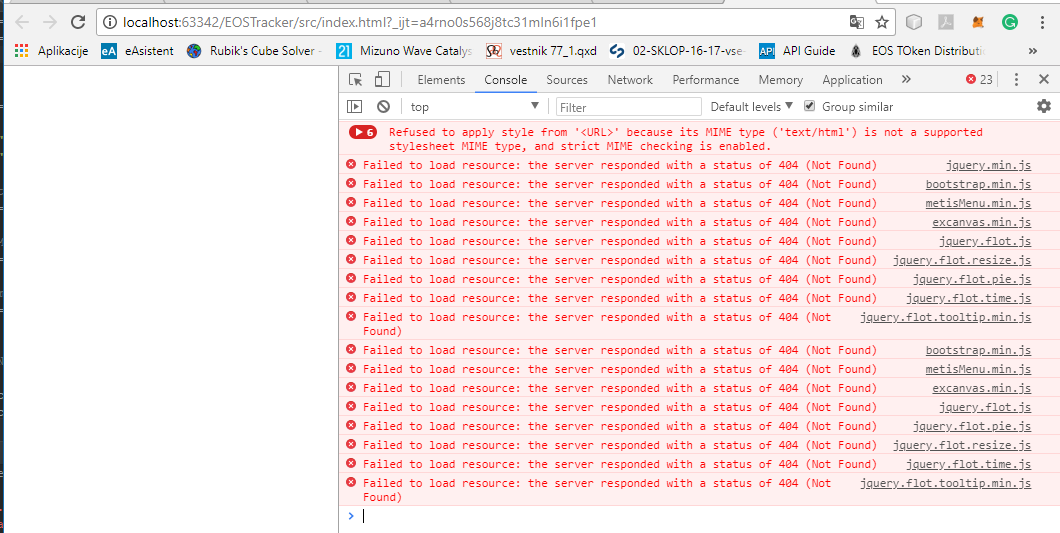
What I'm doing wrong or how to run the project? (have not enough experience with typescript) (I'm familiar with java ;) )
Please sign in to leave a comment.
>The first problem if I hit run I get this kind of warning in the window
These warnings can be safely ignored
> If I run index.html then the web page is not displayed correctly and get a lot of errors in console
these errors indicate that certain URLs in your .html can't be resolved by browser. What does your .html look like? Please provide a file/project
The project I have is imported from GitHub repository: https://github.com/EOSEssentials/EOSTracker
Hmm.. this is the angular cli application that can't be run by opening src/index.html on ther built-in webserver
- it has to be built with webpack first
- it is designed to be served from web server root (<base href="/">); <base href="/"> tells the browser to resolve all URLs in the page relative to the web server root ("http://localhost:63342" if the application is served by WebStorm built-in web server). Obviously no resources can be found there, as the built-in web server serves files from http://localhost:63342/<project name> - thus 404 errors
You need to build the application and start the developmnt server by running .npm start; then, once the application is up and running,create a Javascript Debug run configuration with http://localhost:4200/ URL and run/debug it
see also https://blog.jetbrains.com/webstorm/2017/01/debugging-angular-apps/