Project files location in IntelliJ
Answered

Hi,
I have an issue with project repository location in IntelliJ. The path of project files' location is different from the one where the project is actually located (where the .idea directory exists).
Can anyone help me with changing the path of the project (workspace) to be the same one as where project files are located?
I would like both of the paths in the screenshot to be "C:\Users\pawr\projects\wfs".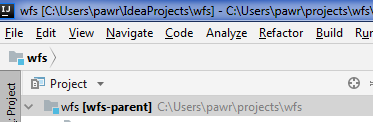
Thanks!
Please sign in to leave a comment.
Hello,
You could create new projecy from existing sources selecting "C:\Users\pawr\projects\wfs" folder.